



Designing complex polymers from scratch can be a rewarding yet error-prone task. A common challenge faced by molecular designers is managing repeat units (monomers) and their connections, especially when diverse bond types and large polymer chains are involved. If you’ve ever wrestled with sequence errors or struggled to keep your monomer arrangements consistent, you’re not alone.
The Polymer Builder app in SAMSON offers a structured way to register and manage monomer sequences, providing visual feedback and flexibility in defining connectivity. In this post, we’ll walk through how you can register and manage polymer sequences efficiently, especially when working with custom monomers and bond types.
Why Register Sequences?
When designing polymers with repeating motifs, registering sequences of monomers allows you to:
- Rapidly reuse patterns across multiple chains
- Combine building blocks with different bond types (single, double, triple)
- Avoid manual recreation of structures with every design iteration
Step-by-Step: Registering Sequences in Polymer Builder
Once you’ve registered your monomers in the Polymer Builder app, follow these steps to define your polymer sequences:
- Click on Add new sequence.
- Type the sequence using the monomer’s assigned letters (e.g.,
ABBA). - Specify bond types directly in the sequence if needed:
=for double bonds (e.g.,A=B)#for triple bonds (e.g.,A#B)
You’ll get immediate status feedback. If there’s an error (e.g., a reference to an undefined monomer), it will be clearly reported.
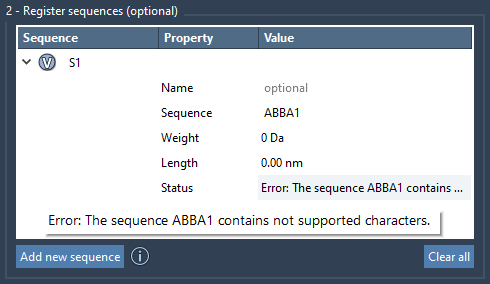
Highlights of Registered Sequences
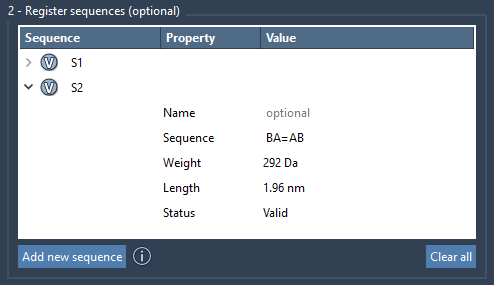
Each registered sequence receives a unique identifier (e.g., S1, S2) that you can use when generating more complex polymers. Click on the V button next to a sequence to visualize the corresponding components. This makes debugging and planning easier. You can even assign a name to group a sequence into a single structural unit in the final polymer.
Editing and Removing Sequences
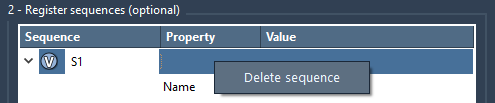
Sequences can be edited directly in the table — update names, change the sequence, or refine bond types. To remove a sequence, simply right-click on it and select Delete sequence. Need a fresh start? Use the Clear all button.
Combining Sequences Later
Once your sequences are defined, you can build full polymers using expressions like:
|
1 |
S1 + 2*S2 + AB=BA + A#B |
This expression-based syntax offers a readable and concise way to describe complex architectures. SAMSON even provides immediate feedback on the estimated molecular weight and chain length, helping you validate your design before generation.
To learn more about Polymer Builder and its advanced features like bond type control, automatic atom matching, and structural grouping, visit the complete documentation:
https://documentation.samson-connect.net/tutorials/polymer-builder/polymer-builder/
SAMSON and all SAMSON Extensions are free for non-commercial use. You can download SAMSON at https://www.samson-connect.net.