



Molecular modelers, imagine having the power to effortlessly select and manipulate atoms in your structures using intuitive scripts. The SAMSON platform makes this possible with the Simple Script Extension. If you often struggle with ensuring precise atom property modifications or building complex atomic designs, this tool is designed to simplify your workflow and elevate your productivity.
What is the Simple Script Extension?
The Simple Script Extension in SAMSON allows you to script and modify properties of atoms in your active molecular models. Whether you’re adjusting positions, visibility, charges, or other properties, this tool introduces a scripting capability that is both powerful and user-friendly for modelers who have basic scripting knowledge. It even leverages predefined variables and mathematical expressions to streamline your edits.
Introducing the Key Features
- Customizability: By utilizing variables like
a.x(position on the x-axis),a.visibilityFlag, ora.element, you can make specific changes to atom properties. Whether you need to adjust coordinates or filter aromatic atoms, it’s all possible. - Mathematical Power: Incorporate standard mathematical operators (e.g.,
+, -, *) along with advanced functions likesqrt,sin, andlog. For instance, you can set the z-coordinate of atoms using sinusoidal transformations for complex geometry. - Structured Logic: Support for logical operators (e.g.,
or,and), conditional statements, and loops makes it easy to define operations that modify specific atoms while ignoring others.
Example: Create Sinusoidal Graphene Sheets
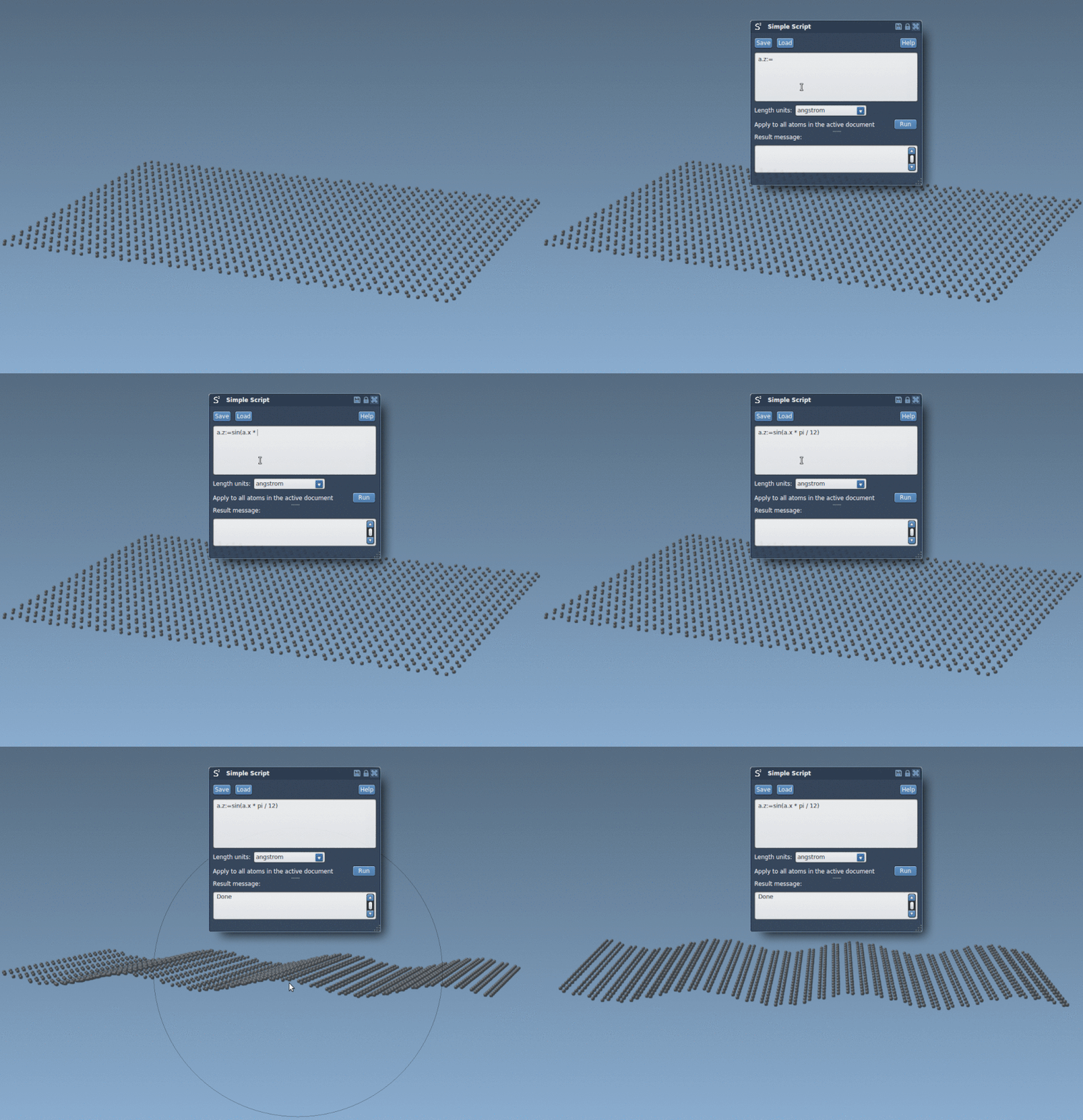
Suppose you want to transform your atomic structure into a wave-like shape. Here’s how it’s done with Simple Script:
|
1 |
a.z := sin(a.x * π / 12); |
After running this script, the z-coordinates of all atoms are adjusted based on a sinusoidal function, as shown in the example below.
Another Use-Case: Select Atoms in a Defined Space
A common molecular modeling task is limiting actions to atoms in a specific region of space. For instance, to select all visible atoms with x and y coordinates greater than 0, you can use:
|
1 |
if (a.x > 0 and a.y > 0) n.selectionFlag := 1; else n.selectionFlag := 0; |
Scripts like this ensure precision when handling atoms in your structures, eliminating tedious manual filtering.
Advanced Customization: Nano-Batarangs
Imagine using your molecular tools to craft something as unique as a nano-scale Batman batarang! Leveraging coordinated logical conditions and math-driven shapes, you can selectively modify atoms to cut out intricate designs. To see an example of such scripting in action, here’s an illustration:

These scripts let you masterfully sculpt atomic arrangements, providing both a fun and educational way to understand atom selection and editing in SAMSON.
Getting Started
To begin, add the Simple Script Extension to your SAMSON workspace. Follow the provided examples to get hands-on experience, starting with basic syntax and gradually exploring more advanced operations.
For further details and comprehensive examples, visit the official documentation page: Making Nano-Batarangs (and more).
Note: SAMSON and all SAMSON Extensions are free for non-commercial use. Download SAMSON today at www.samson-connect.net.