



Molecular modeling often requires precise control over atomic properties to achieve desired outcomes. As a molecular modeler, you might have faced the challenge of editing atomic properties or performing complex selections at the atomic level. SAMSON’s Simple Script Extension offers a straightforward scripting interface to solve these challenges, enabling you to manipulate atomic properties with mathematical functions and logical expressions.
Why Use the Simple Script Extension?
Working at an atomic scale requires a way to control and modify specific properties of atoms efficiently. The Simple Script Extension gives you this capability by allowing the application of mathematical expressions directly to atom attributes such as position, visibility, or element type. This can save significant time and effort compared to manual adjustments, especially for larger molecular systems.
Getting Started with Variables
The extension connects scripting with atom-level control. Variables for atoms are defined as per SAMSON’s Node Specification Language, but here element symbols and names must use single quotation marks (e.g., 'Carbon', 'Fe'). Key attributes available for scripting include:
a.x,a.y,a.z: Atomic positions.a.visibilityFlag: Controls visibility (1for visible,0otherwise).a.chainID,a.element,a.serialNumber: Identify elements or groups of atoms.
Using these, you can select atoms, change visibility, or reposition atoms in space, opening up a wide range of possibilities.
Powerful Capabilities at Your Fingertips
The scripting engine supports standard mathematical operators (+, -, *, /, %, ^), functions (e.g., sin, sqrt, log), and logic structures like if-then-else statements and loops (for, while). For example, shifting the y-coordinate of atoms identified by elementID == 2 is as simple as:
|
1 |
if (a.elementID == 2) a.y += 5.25; |
You can also use ternary operators for concise expressions:
|
1 |
(a.x > 0 and a.y > 0) ? a.visibilityFlag := 1 : a.visibilityFlag := 0; |
Practical Examples
Here are some quick highlights to spark your imagination:
-
Create sinusoidal patterns by modifying atomic
z-coordinates based on thesinfunction:1a.z := sin(a.x * π / 12);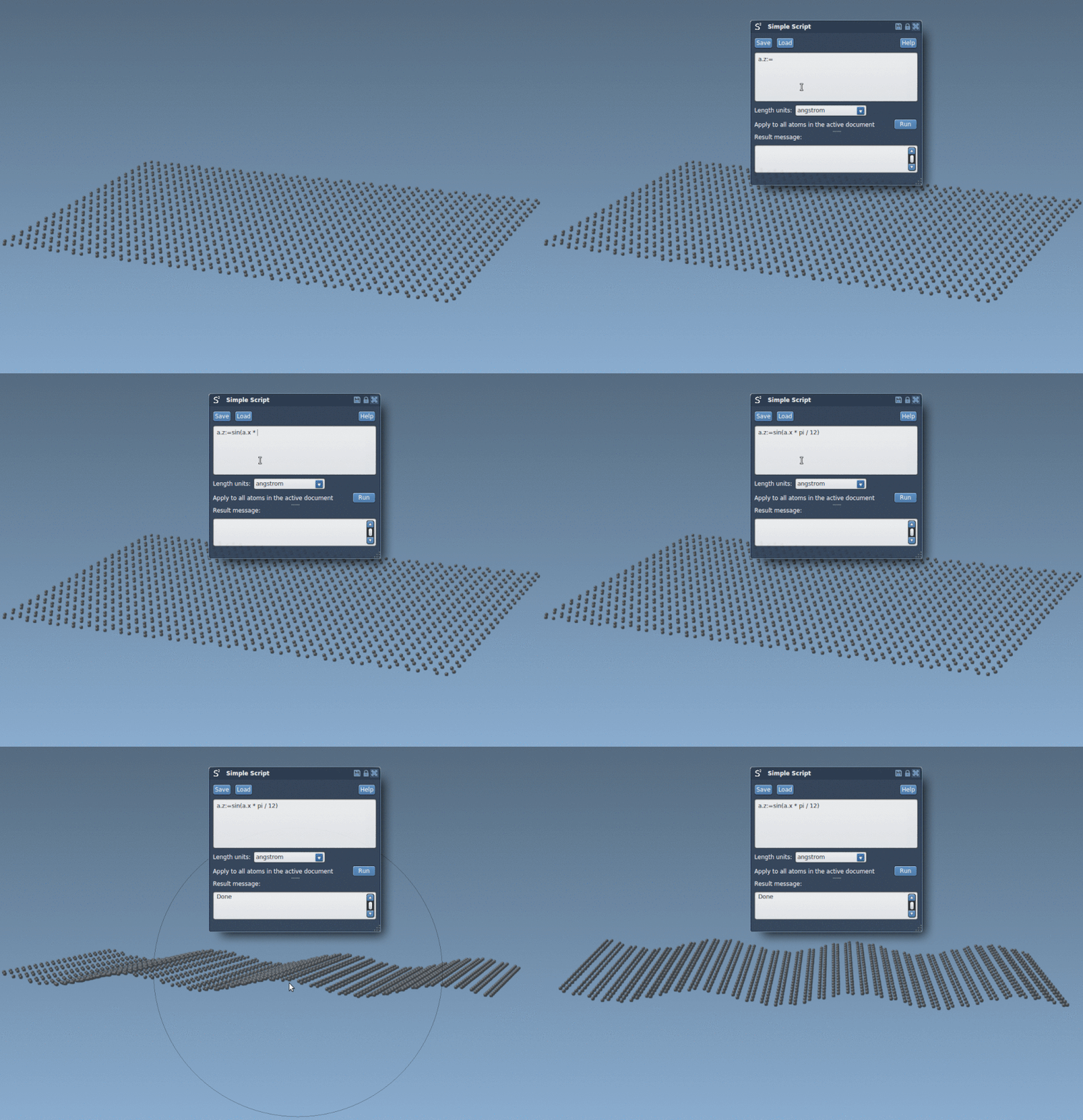
-
Hide atoms outside a spherical region:
1if ((a.x^2 + a.y^2 + (a.z - 2)^2) < 100) a.visibilityFlag := 1; else a.visibilityFlag := 0; -
How about creating a nano-batarang out of graphene? Yes, that’s possible too with scripting! You can combine precision and creativity to carve unique shapes at the molecular level. Here’s a visual output of a nano-scaled batarang:

Why This Matters
These capabilities allow not just visualization but also the creation and modification of molecular structures with unparalleled control. Whether you’re interested in creating realistic models or crafting imaginative shapes like the famous batarang, the Simple Script Extension is a versatile tool for molecular designers.
To dive deeper into examples or learn how to unlock its full potential, check the official documentation page.
Note: SAMSON and all SAMSON Extensions are free for non-commercial use. You can get SAMSON at samson-connect.net.