



For molecular modelers, honing in on precise crystal structures and manipulating them with accuracy can often be a challenging task. What if you could visualize, adjust, and refine crystal properties with ease? SAMSON’s Crystal Creator provides a robust toolset for crystal manipulation, helping you cut crystals, inspect defects, and even explore substitutions. This blog post dives into how you can effectively manipulate crystals to support your molecular modeling workflows, ensuring a seamless experience in fine-tuning your materials.
Why Crystal Manipulation Matters
The ability to manipulate crystals is crucial when studying material properties. Whether it’s adjusting defects to simulate real-world conditions or inspecting how substitutions impact a material’s functionality, achieving this effortlessly is key for molecular modelers. Many platforms don’t combine accessibility and flexibility, leaving users to juggle between tools. This is where SAMSON’s Crystal Creator extension makes an impact—it transforms what could be a convoluted process into an intuitive workflow.
Getting Started: Crystal Properties
Once you’ve imported your crystal structure into SAMSON via the Crystal Creator, manipulating it is straightforward. Right-click on the property model of your crystal and select Properties to access specialized options for inspection and adjustment. Within the property window, you’ll find two feature-rich tabs:
- Crystal Visualization and Cutting Tools
- Use the button to locate your crystal easily in case you’re working with a dense dataset.
- Toggle the checkbox to inspect the crystal’s mesh and better understand its structure.
- The cutting toolbox lets you define directional cuts with precision. Enter Miller indices for the cutting direction, specify the distance from the origin, and analyze the resulting slab.
- Defect and Substitution Verification
- Verify your crystal’s defect ratios against the Crystallographic Information File (CIF) data by clicking Check Atoms Ratio. This ensures that substitution patterns or defects are consistent with the intended design.
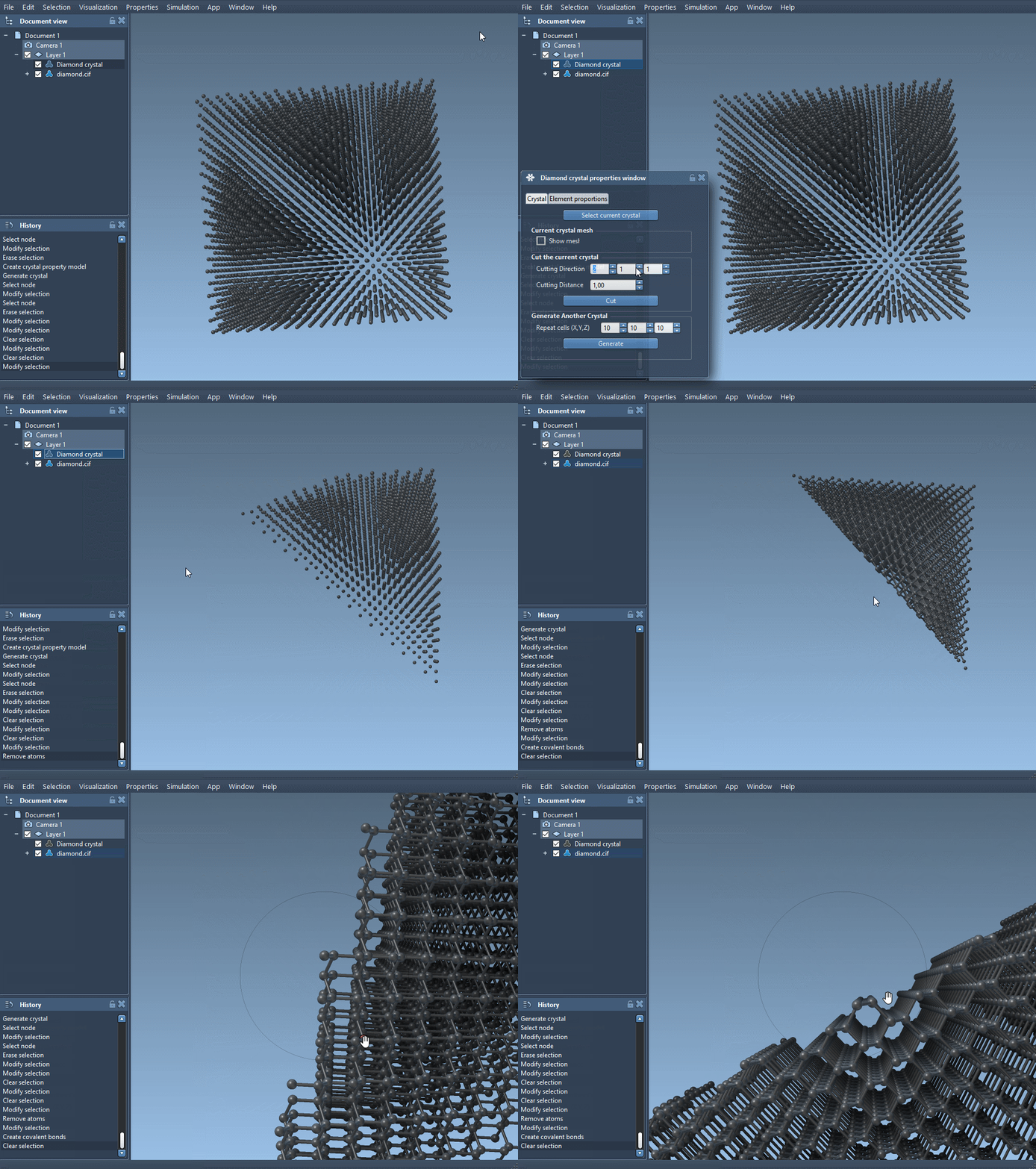
For example, you can inspect a diamond crystal structure, adjust its defects, and cut it along the [111] direction to observe the characteristic compact hexagonal arrangement. This level of control is invaluable when working with complex crystalline materials.
Crystal Cutting in Action
Imagine working with a diamond crystal and needing to study its structure under specific orientations. You can achieve this by cutting it along precise directions. Let’s break it down:
- Import a diamond crystal CIF file.
- Open Properties and locate the cutting tools.
- Set the cutting direction to
[111]and adjust the cutting distance. As you make adjustments, observe how the geometry transforms, revealing the compact structure unique to this arrangement.
This workflow is visually supported in SAMSON, offering not only numerical adjustments but also real-time visual feedback. Here’s an illustration to show how seamless the process is:
Why You Should Explore Defect Analysis
Defects and substitutions often dictate the material properties of a crystal. Defining these elements accurately in the CIF file and visualizing their impact in SAMSON helps you understand subtle yet critical changes in your material’s behavior. For academic and industrial researchers alike, verifying substitution and defect ratios ensures alignment with experimental data or theoretical models.
Take the Next Step
If you’re ready to dive deeper into crystal property analysis and other materials workflows, the Crystal Creator documentation is filled with resources to guide you. From creating custom crystals to leveraging advanced visualization tools, SAMSON opens up a world of possibilities in material science modeling.
Note: SAMSON and all SAMSON Extensions are free for non-commercial use. You can download SAMSON from here.