



For molecular modelers, exploring chemical space and designing new analogs is a frequent and necessary task. But let’s face it: generating an entire series of molecular analogs manually can quickly become tedious and time-consuming. If you’re in search of a faster and more systematic approach, the Positional Analogue Scanning feature in SAMSON’s SMILES Manager offers an efficient solution to streamline your workflow.
What is Positional Analogue Scanning?
Positional Analogue Scanning (PAS) is an elegant method to systematically explore substitutions on a molecule by defining a pattern that will be replaced or modified. Imagine starting from a single reference molecule and rapidly generating multiple analogs by scanning different substitutions or attachments at specific positions. Whether you are designing better ligands for your target protein or comparing analogue properties, PAS can save hours of work while ensuring accuracy.
How Does It Work?
The process is straightforward:
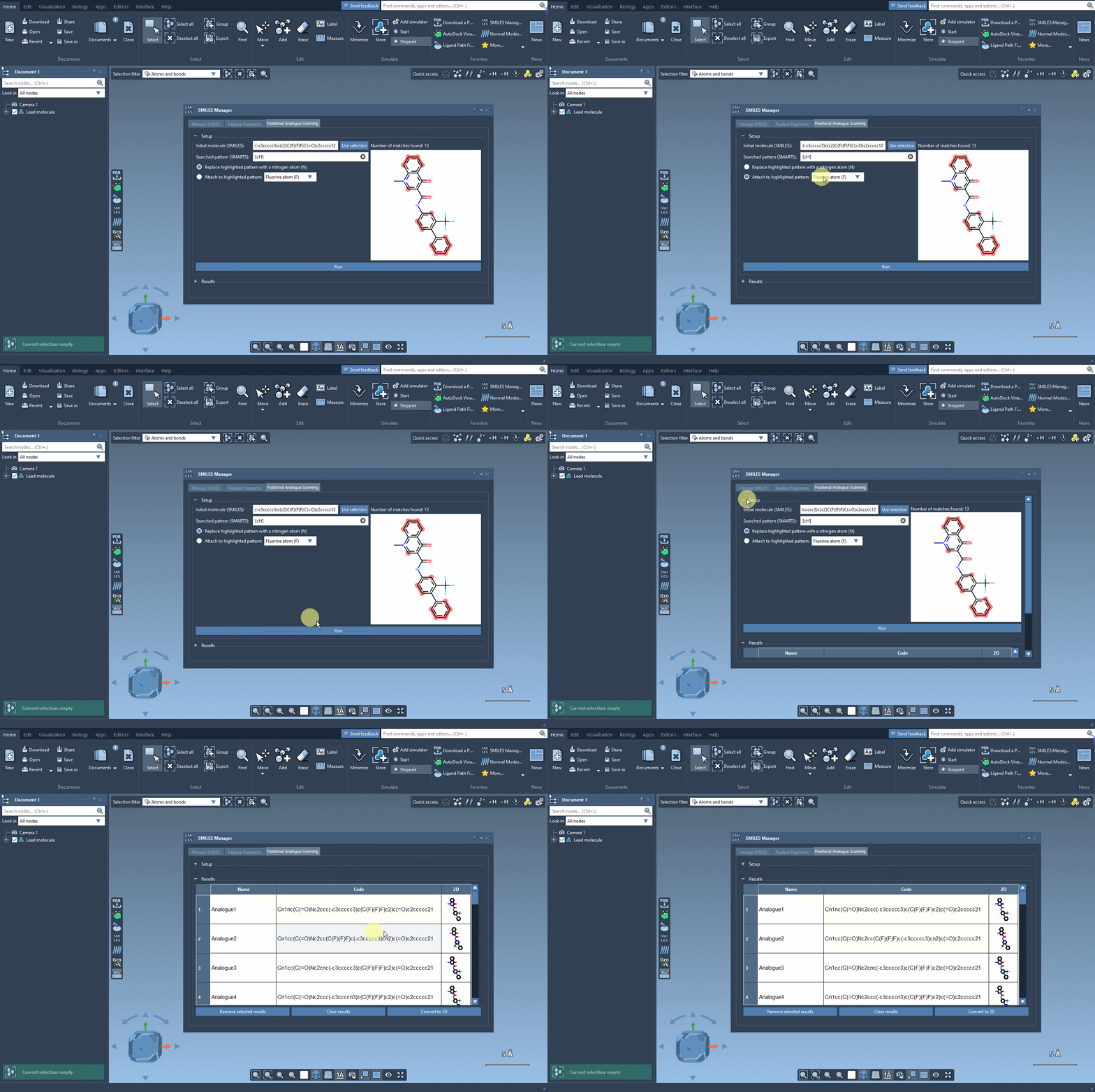
- Define the starting molecule: Enter the SMILES code of your starting molecule or select it directly within SAMSON and use the Use selection button.
- Identify a pattern: Specify the structural pattern in your molecule that you want to modify using SMARTS code. For instance, if you want to target aromatic carbons, you can use the code
[cH]. This pattern will be automatically detected and highlighted in your molecule. - Run substitutions: Once you’ve identified the position, you can choose to replace it with atoms (e.g., nitrogen) or groups (e.g., methyl). Simply click Run to generate the analogs, and you’ll see both the SMILES codes and 2D depictions of the generated molecules.
Take a look at how the process works in action:
Refine and Analyze Results
After generating the analogs, SAMSON allows you to modify or analyze the results with ease:
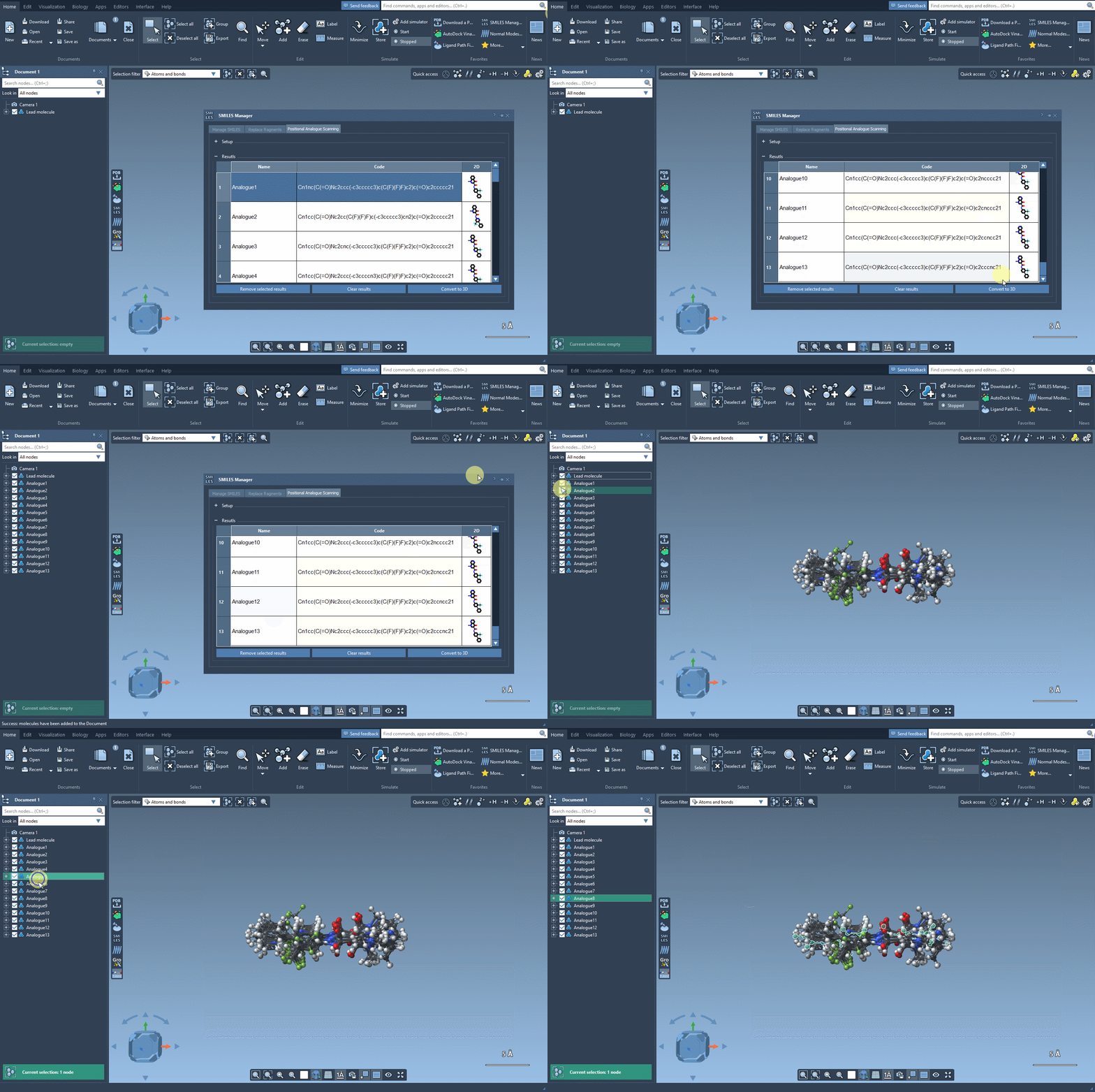
- Edit analogs: Change the SMILES code or name directly in the results table.
- Generate 3D structures: Transform any analog into a 3D structure using the Convert to 3D button and take the analysis further with docking studies.
- Filter results: Hide or show 2D images, selectively delete rows, or clear the entire results table based on your needs.
For instance, you can generate 3D structures of analogs and prepare them for docking experiments using extensions like AutoDock Vina Extended. By studying the interaction of these analogs with your target protein, you can quickly identify structural changes that preserve or enhance desirable interactions.
Why Use This Approach?
The PAS workflow in SAMSON is particularly valuable because it enables you to:
- Save significant time in generating analog series compared to manual approaches.
- Design better compounds by systematically exploring substitutions and their impact.
- Integrate seamlessly with 3D modeling and docking tools to continue your analysis.
Whether you are optimizing lead compounds or exploring novel structures, SAMSON’s PAS feature is a practical tool to expand your chemical intuition while handling routine tasks efficiently.
Want to Learn More?
Ready to dive deeper? Consult the detailed documentation page for a step-by-step guide to Performing Positional Analogue Scanning in SAMSON. It includes additional details, examples, and links to related workflows to enhance your experience.
SAMSON and all SAMSON Extensions are free for non-commercial use. You can get SAMSON at www.samson-connect.net.