



In molecular modeling, accurately describing a transition pathway between two molecular states can be a daunting challenge. Whether it’s a ligand unbinding, a protein folding event, or a conformational change, the path between two relaxed states often requires optimization to make the transition more physically meaningful. This blog explores how to streamline this process using the Parallel Nudged Elastic Band (P-NEB) app in SAMSON.
Why Refining Transition Paths Matters
Raw transition paths, often generated by interpolation or preliminary methods, tend to include physically unrealistic intermediate states. This can lead to inaccuracies in energy estimations or misinterpretation of the molecular behavior. The P-NEB app optimizes these paths, ensuring a smoother, more physically accurate trajectory. By refining paths, users can discover intermediate states with greater precision and enhance the reliability of their computational experiments.
Step-by-Step: Applying P-NEB to Path Nodes
Follow these steps in SAMSON to refine your molecular pathways with the P-NEB app:
1. Prepare Your Data
Before using the app, ensure you have generated a preliminary path or a set of conformations between two molecular states. For instance, you could use linear interpolation, tools like the Ligand Path Finder, or ARAP Interpolation.
2. Open the P-NEB App
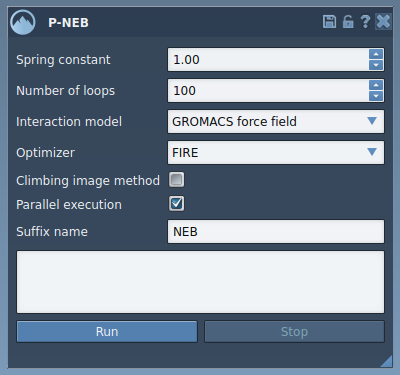
Navigate to Home > Apps > All > P-NEB or quickly locate the app using the Find everything… search bar. The app’s user interface includes fields for configuring parameters like the spring constant, interaction model, optimizer, and parallel execution.
3. Select Your Path in the Document View
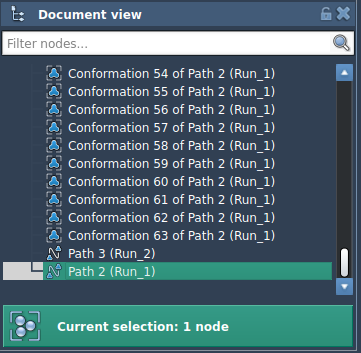
In the Document View, identify and select the path node representing your trajectory. Once selected, return to the P-NEB app to begin the optimization process.
4. Configure P-NEB Settings
Now, customize the following settings:
- Spring constant: Controls the spring strength for maintaining even spacing between intermediate states. A value of 1.00 works well in most cases.
- Number of loops: Determines the number of optimization rounds. Opt for 100 for detailed refinements.
- Interaction model: Choose “Universal Force Field” for interaction calculations.
- Optimizer: Select “FIRE” (Fast Inertial Relaxation Engine) for efficient energy minimization.
- Parallel execution: Check this box to utilize multi-threading for faster optimization if available.
5. Run the Optimization
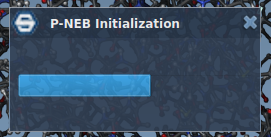
After configuration, click Run. The Universal Force Field (UFF) setup may ask whether to use existing bonds—choose “Use existing bonds” and click OK. The app will begin optimizing the path, displaying the progress in the status bar at the bottom of the interface.
Once the optimization process completes, a new refined path will appear in the Document View:

6. Inspect the Results
The newly created path can be examined in detail using SAMSON’s Inspector tool. Double-clicking the path also allows users to animate and visualize the transition in real time.
Important Considerations
Optimization is generally faster for path nodes than for sets of conformations, as all intermediate states are already linked within a trajectory. If working with conformations, you can first combine them into a path using the Conformation > Create path from conformations context menu option for easier optimization.
Start Refining Your Transition Paths
Better data leads to better insights. By refining your transition paths with the P-NEB app, you enhance both the accuracy and interpretability of your molecular models. This process, while seemingly technical, provides molecular modelers with a critical tool to address some of the toughest challenges in computational chemistry.
To learn more about optimizing transition pathways in SAMSON using P-NEB, visit the detailed tutorial in the official documentation.
SAMSON and all SAMSON Extensions are free for non-commercial use. Download SAMSON today at www.samson-connect.net.