



For molecular modelers, understanding how different parts of a molecule interact is crucial. Whether it’s visualizing protein-ligand contacts or analyzing binding pockets, these interactions heavily influence the success of molecular design projects. However, transitioning between 3D and 2D views while maintaining synchronization can be a tedious and error-prone process. That’s where the Interaction Designer in SAMSON can make a real difference.
The Interaction Designer helps you generate 2D molecular interaction diagrams effortlessly from your 3D molecular structures, ensuring the 2D and 3D views stay synchronized. This allows for smoother selection, editing, and navigation in an integrated environment. Here’s how it works and how it can help streamline your workflow:
Creating Interaction Diagrams
The Interaction Designer offers a dedicated feature for generating detailed 2D interaction diagrams based on your current selection or the entire document if nothing is selected. By simply using the Home > Diagram command, you can automatically visualize the interactions in a clean and dynamic format.
These diagrams include features like:
- Tight 3D integration: Select atoms and zoom on structures directly from the 2D diagram or the linked 3D viewport.
- Binding pocket visualization: Ideal for exploring protein-ligand interactions.
- Solvent accessibility insights: Check the solvent exposure of ligand atoms.
- Interacting residues: Highlight key residues and structural groups involved in interactions.

Enhanced Customization
The Interaction Designer isn’t just about generating diagrams—it gives you full control over how they appear:
- Editable labels and symbols: Drag-and-drop to adjust layouts for better presentation. Customize the caption or legend placement as needed.
- Interaction visibility: Hide or show specific interactions by toggling their names or icons in the legend.
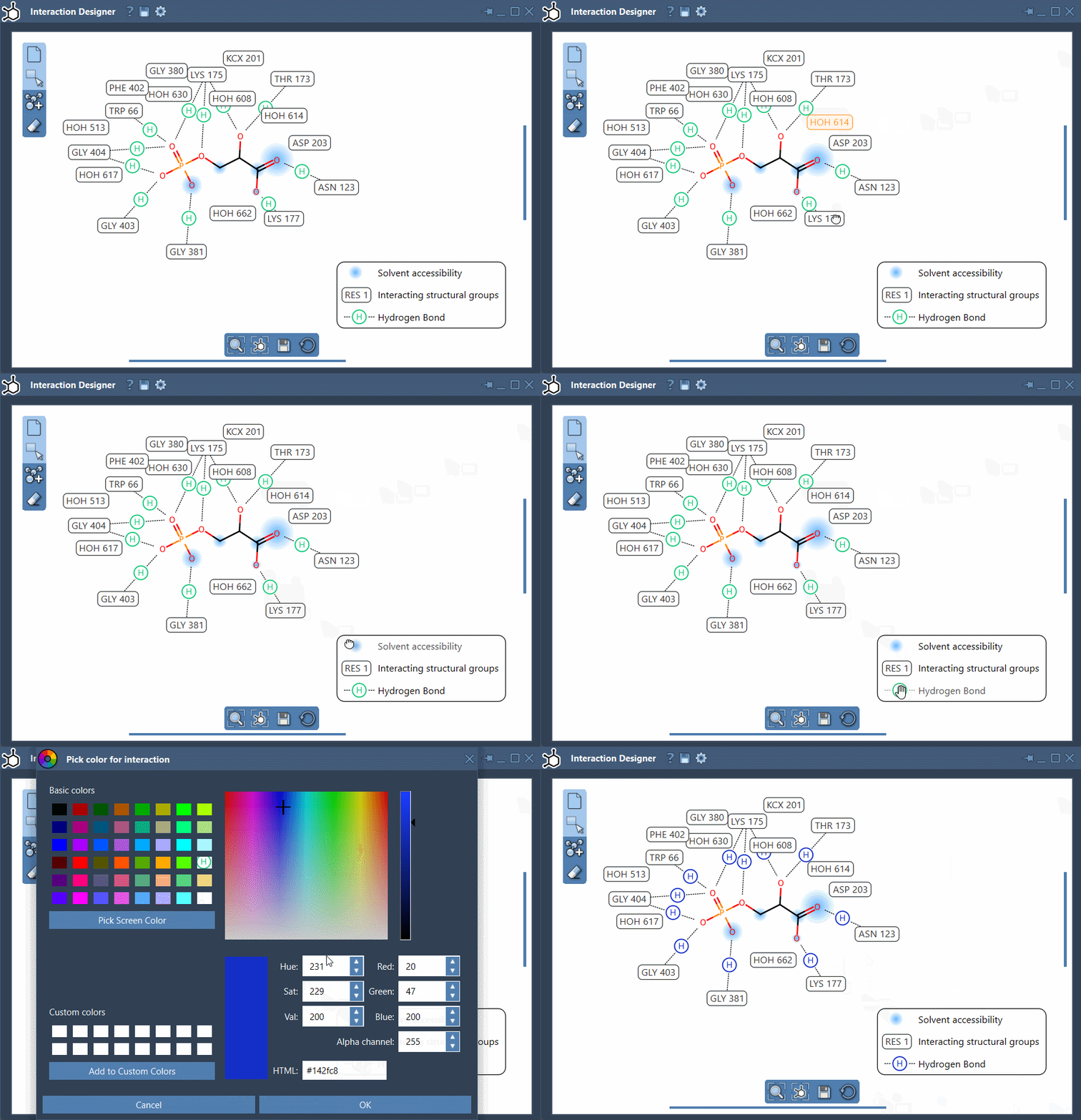
- Color control: Adjust interaction colors by double-clicking on their name or icon in the legend. You can also restore default colors from the Designer settings.
Try moving the labels or tweaking colors to align with your project visuals and presentation standards. The screenshot below illustrates this flexibility in action:
Boosting Productivity
With its integration of 2D and 3D views, the Interaction Designer helps you save time by letting you explore, edit, and enhance molecular interactions with ease. Quick operations like zooming, aligning views, or translating diagrams are intuitive: simply use Ctrl/Cmd plus your mouse scroll button for zooming, or hold middle and right mouse buttons to translate the view.
Furthermore, the software includes tools for exporting your diagrams. Save them as png, jpeg, bmp, or svg directly from the interface, making it straightforward to share and document your results.
Ready to Explore?
If you’ve been searching for a way to simplify interaction analysis in molecular modeling, the Interaction Designer can help you create clean, customizable diagrams bridging 2D and 3D seamlessly. Learn more about how to leverage this tool by visiting the full documentation at this link.
SAMSON and all SAMSON Extensions are free for non-commercial use. You can download SAMSON for free at SAMSON’s official site.