



One challenge faced by many molecular modelers is understanding complex biological assemblies. Is symmetry a hidden key to empowering your simulations? The Symmetry Detection extension in SAMSON simplifies this by automatically identifying and visualizing symmetry axes in protein complexes, viral capsids, and large macromolecular assemblies. In this post, we’ll show you how detecting symmetry can reduce computational workloads, validate experimental data, and enhance molecular designs with ease.
The Case for Symmetry Detection
Why invest time in analyzing symmetry? Identifying and leveraging symmetry in biological assemblies is not just about aesthetics—it opens up opportunities for:
- Validating Experimental Structures: Detect expected symmetry elements to quickly verify complex models.
- Reducing Computational Costs: Focus on the unique asymmetric unit rather than the entire system, saving precious time on simulations.
- Guiding Design: Develop symmetric materials or target specific domains for mutagenesis studies.
For example, confirming icosahedral symmetry in a viral capsid lets you efficiently simulate only a single slice rather than an entire 3D structure of hundreds or thousands of components.
How to Detect Symmetry in SAMSON
With SAMSON, symmetry detection is an intuitive process:
- Launch SAMSON and load your desired biological assembly. Options for this include fetching structural data directly from the Protein Data Bank (PDB) or importing user-provided assemblies.
- Activate the Symmetry Detection extension under
Home > Apps > Biology > Symmetry Detection. - Click “Compute Symmetry” and let the software automatically inspect the structure for possible symmetry axes.
- Examine the results. Groups of detected symmetries are presented alongside metrics like their RMSD. Single-click to highlight axes or double-click to align the view for exploration.
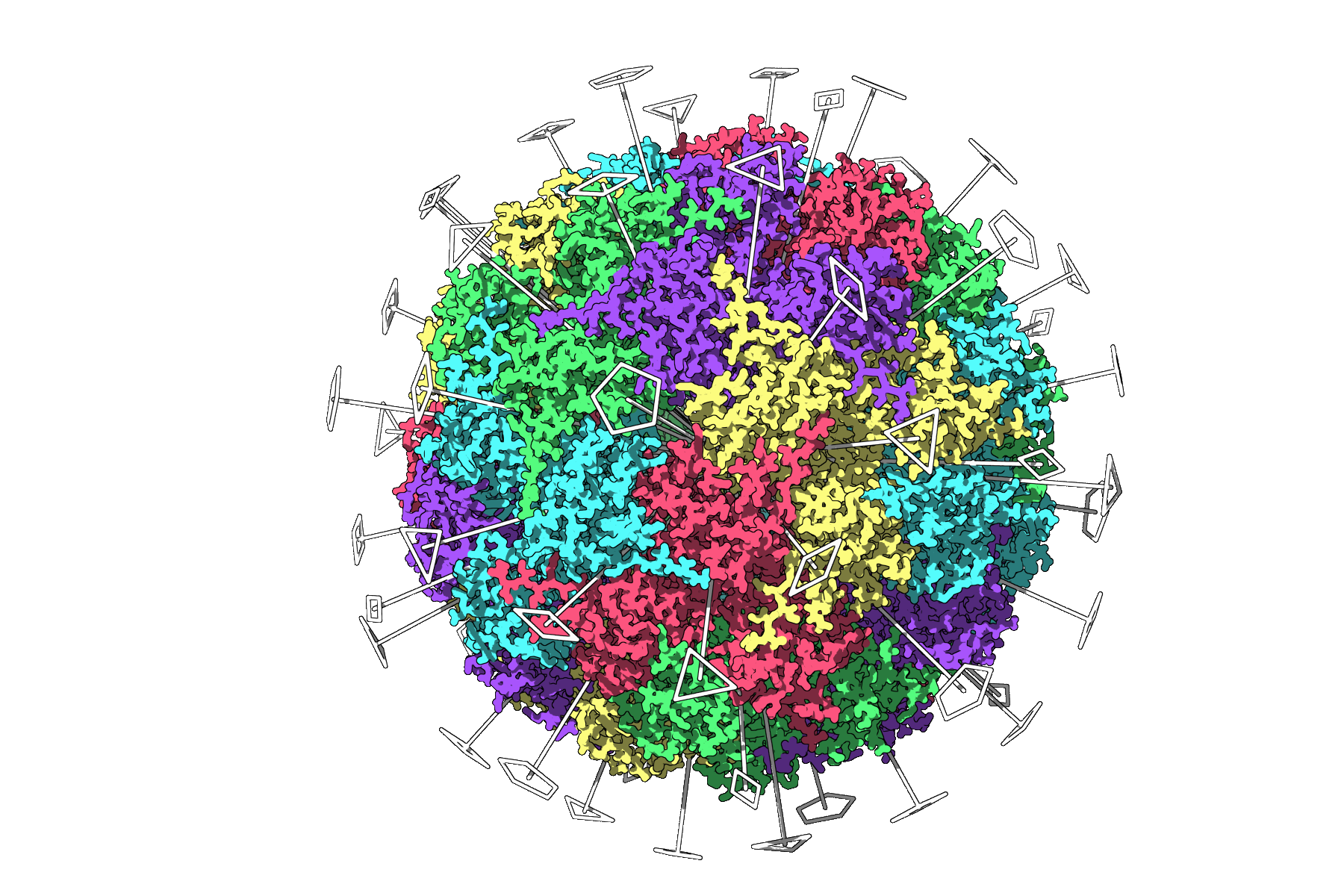
Here’s an image of a successful symmetry analysis on a viral capsid (3NQ4), visualizing all 2-fold, 3-fold, and 5-fold axes:
Applications in Molecular Modeler’s Workflows
Symmetry detection isn’t just a theoretical tool—it has profound concrete applications:
- Nanoparticle Design: Identify repeating units, design symmetric ligands, and accelerate nanostructure development processes.
- Simulations: Use visualization of detected axes to decide which regions of a symmetrical assembly to focus on for high-resolution, time-intensive simulations.
- Biological Insights: Confirming symmetry helps determine functional interfaces that are repeated across an assembly.
Tips for Enhanced Visual Analysis
To get the most out of your symmetry detections, use SAMSON’s visualization features:
- Overlay symmetry axes on ribbons or surface views for clarity and context.
- Diversify colors across chains to emphasize repeats.
- Capture high-quality snapshots for visual presentations, directly from SAMSON’s viewport.
Ready to Give It a Try?
The Symmetry Detection extension in SAMSON is an indispensable tool to save time, improve precision, and simplify complex molecular designs. To dig deeper or follow a step-by-step guide, visit the full documentation page: Symmetry Detection in Biological Assemblies.
SAMSON and all SAMSON Extensions are free for non-commercial use. Get started for free today at samson-connect.net.