



For molecular modelers navigating complex systems of molecules, keeping track of specific selections can be a daunting task. Fortunately, SAMSON’s Quick Groups feature provides an elegant and efficient solution. This blog post explores how Quick Groups can transform your molecular modeling workflows, allowing you to swiftly save, navigate, and manipulate selections.
What Are Quick Groups?
Quick Groups are temporary, unnamed groups designed to help you quickly toggle between and operate on different selections in a SAMSON document. Whether you’re analyzing complex molecular systems or preparing a simulation, Quick Groups enable you to streamline your workflow by providing immediate access to different parts of your structure.
These groups appear in the lower section of the Document view and can be easily assigned and accessed using keyboard shortcuts such as Shift + 1 or 1 alone for toggling. Think of them as “control groups” for molecular modeling, inspired by real-time strategy games.
Assigning Quick Groups
Here’s how to assign selections to Quick Groups:
- Make a selection such as atoms, residues, or another node type.
- Assign the selection to a Quick Group using one of two methods:
- Mouse method: Hover over a Quick Group slot in the Document view and press Shift + click.
- Keyboard method: Press Shift + a number (e.g., Shift + 2 for Quick Group 2).
- You can assign up to 10 Quick Groups (indexed from 1 to 10).
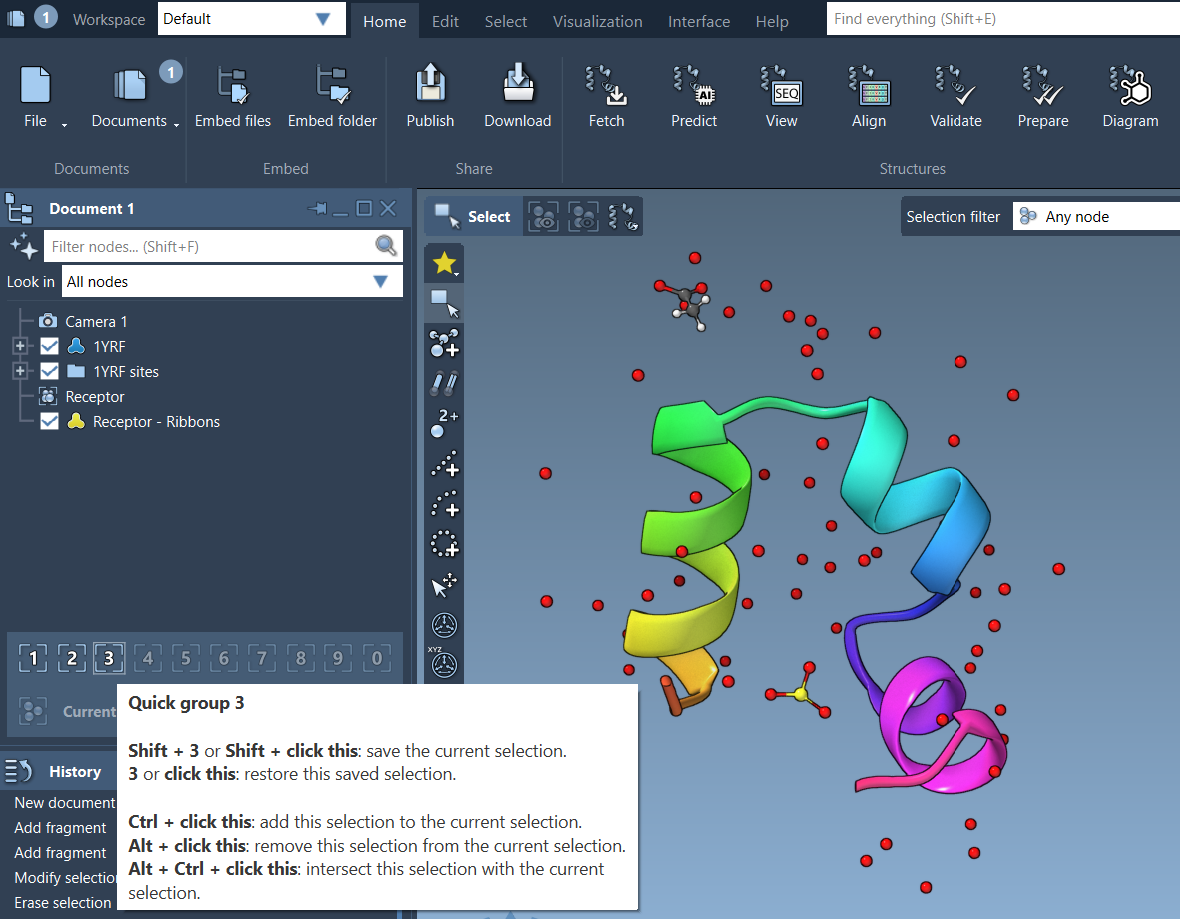
Switching Between Quick Groups
Once Quick Groups are assigned, navigating between them is simple:
- Press the corresponding number key (1, 2, etc.) to switch the selection to the desired group.
- Double-press a number key (e.g., 1, 1) to zoom in on that group’s selection.
- Alternatively, click directly on Quick Group icons in the Document view.
This ability to seamlessly switch between areas of interest is invaluable for managing and comparing different regions of a molecular system.
Practical Example
Let’s consider a practical workflow for Quick Groups:
- Select a ligand and assign it to Quick Group 1.
- Select a receptor and assign it to Quick Group 2.
- Select water molecules and assign them to Quick Group 3.
- Effortlessly toggle between the selections using 1, 2, and 3.
- Apply unique visual styles or perform different transformations on each group.
This streamlines operations like visualization, simulation preparation, and interaction analysis while reducing errors and confusion.
Iterative Design Made Easy
Quick Groups are particularly useful for iterative workflows. They can be redefined or cleared at any time, giving you the flexibility to adapt to changing analysis requirements as you design, simulate, or refine structures.
Ready to Try Quick Groups?
Quick Groups complement SAMSON’s vast array of selection tools, making molecular modeling faster and more intuitive. By assigning and toggling between selections with ease, you can focus more on understanding your molecular system and less on repetitive selection tasks.
To explore Quick Groups in more detail, visit the SAMSON documentation page.
Note: SAMSON and all SAMSON Extensions are free for non-commercial use. Discover more and download SAMSON from SAMSON Connect.