



Preparing input files for molecular simulations can sometimes feel like a convoluted process, particularly when you need the atomic coordinates along a specific path for reaction coordinate studies or free energy calculations. With SAMSON’s Export Along Paths extension, you can now simplify this task in just a few steps. In this post, we'll guide you through exporting atom trajectories along defined paths in SAMSON and discuss some potential use cases for this feature.
Why export atom trajectories?
In molecular modeling, exporting atomic coordinates along paths plays a vital role in diverse workflows. For example, these exported trajectories can serve as input for free energy profiling, provide ligand exit/entry trajectories for enhanced sampling methods, or simply allow you to visualize intermediate molecular states. With the Export Along Paths extension in SAMSON, this powerful function is available to you.
How to get started
Before you jump in, you'll need to ensure the Export Along Paths extension is installed. To do so:
- Log in to SAMSON Connect.
- Find the Export Along Paths extension via its page and click Add.
- Restart SAMSON to begin using the extension.
Step-by-step: Export atom trajectories
Option 1: Export all atoms
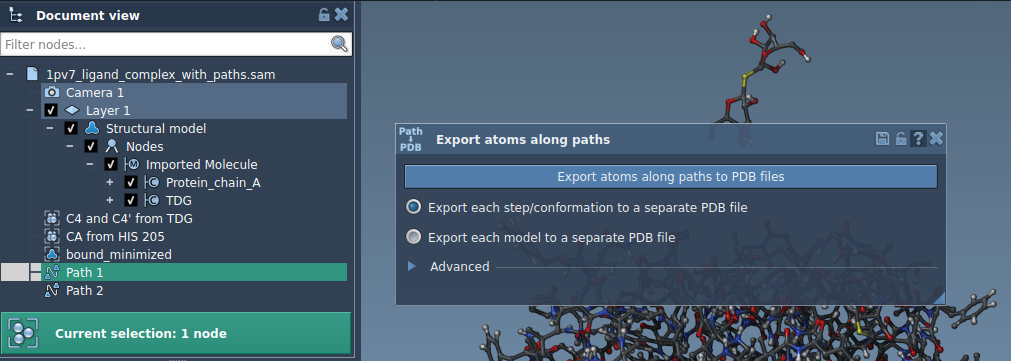
If you want to export the trajectories for all atoms along a path, follow these steps:
- Select one or more paths in the Document view of SAMSON.
- Choose your preferred export mode:
- Export all frames in a single PDB file.
- Export each frame as a separate PDB file.
- Click Export atoms along paths to PDB files. You will be prompted to select a destination folder and assign a file prefix.
Optional: Open the Advanced section to adjust the frame export interval for finer control.
Option 2: Export a subset of atoms
If you only need coordinates for specific atoms, such as ligands or a functional site on a protein, the extension provides a customizable workflow:
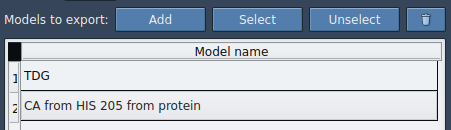
- In the Advanced panel, select a specific subset of atoms in the Document view. For example, you might select the ligand
TDG. - Click Add to define this selection as a "model" for export. The model will appear in an export table, where you can rename it, highlight/select/unselect its atoms, or add additional sets of atoms to export.
- Choose an output format (single or multiple PDB files) and select the relevant path(s).
- Click Export atoms along paths to PDB files. Assign a destination folder and file prefix.
This approach gives you granular control for tailored simulations and analyses.
Key applications
Exporting atom trajectories along paths opens doors to a variety of tasks in molecular modeling, such as:
- Generating reaction coordinate files for free energy profiling.
- Visualizing ligand exit or entry pathways for drugs or inhibitors.
- Tracking backbone movements or specific atomic groups over time.
- Creating intermediate states for downstream visualization or simulation workflows.
Whether you are simulating ligand unbinding or refining protein pathways, this feature saves considerable time and streamlines your project pipeline.
Where to learn more
For complete details on the Export Along Paths app, visit the official documentation at this page.
SAMSON and all SAMSON Extensions are free for non-commercial use. Get SAMSON at https://www.samson-connect.net.