



Molecular modelers frequently face challenges when analyzing Potential of Mean Force (PMF) profiles after extensive umbrella-sampling simulations. Translating simulation data into meaningful results can be time-consuming and requires the right tools. To address this need, the GROMACS Wizard in SAMSON offers an intuitive approach to PMF computation using the powerful Weighted Histogram Analysis Method (WHAM). Let’s delve into how you can efficiently compute and interpret PMF profiles with this tool.
Why PMF Analysis Matters
PMF profiles help molecular modelers understand the free energy landscape along a reaction coordinate. This is essential for exploring molecular interactions, binding affinities, or conformational changes. However, deriving these profiles demands careful processing of umbrella-sampling data. Missteps or inefficiencies during this process may lead to incomplete or inaccurate results. GROMACS Wizard simplifies the workflow while ensuring precision.
Step-by-Step PMF Computation
Follow these straightforward steps in GROMACS Wizard to compute PMF profiles:
1. Preparing Your Data
- Ensure you’ve completed an umbrella-sampling workflow first. This tutorial provides the data used for PMF analysis.
- Confirm that your input folder contains numbered subfolders corresponding to different reaction-coordinate windows for the same system.

2. Compute the PMF
- Open the WHAM Analysis tab in GROMACS Wizard.
- Either specify the project path manually or click the auto-fill button (
 ) to load the path from the umbrella-sampling workflow.
 - Select the reaction coordinate and make any necessary adjustments to settings, such as custom bounds or specific energy units.
- Click Compute. Depending on trajectory size, this may take seconds to minutes.
3. Visualizing Results
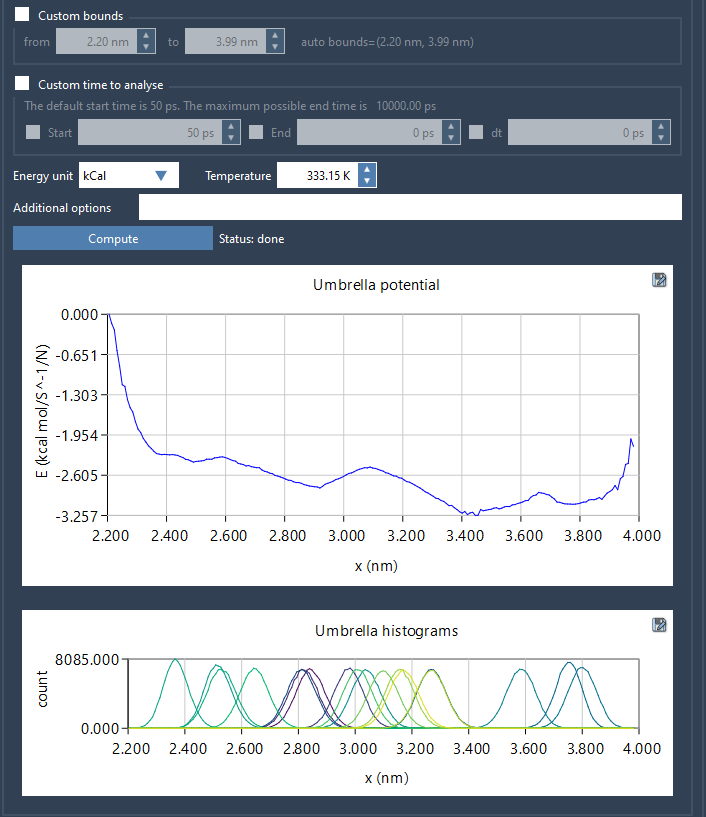
Upon computation, GROMACS Wizard generates two plots:
- The PMF profile, displaying the free energy landscape.
- A histogram illustrating how well the coordinate space is covered, helping to identify regions requiring additional sampling.
Refining Your Analysis
The histogram provides critical feedback about sampling adequacy. Regions with sparse sampling may produce less reliable PMF results. In such cases, you can revisit the umbrella-sampling phase and refine your simulations by adding or extending windows, ensuring better coverage for accurate analysis.
Final Thoughts
By leveraging GROMACS Wizard in SAMSON, molecular modelers can streamline the process of PMF analysis, from raw data to insightful visualizations. This approach minimizes errors, improves workflow efficiency, and provides valuable feedback for refining simulations.
Discover more details and steps in the full PMF analysis documentation.
SAMSON and all SAMSON Extensions are free for non-commercial use. Get SAMSON at https://www.samson-connect.net.