



A protein–ligand simulation can stall before the first molecular-dynamics step—not because the binding pose is wrong, but because the ligand structure and its topology do not agree. Atom names, hydrogen placement, residue names, and force-field choices all need to line up. Getting these details in order before preparation can save a lot of troubleshooting later.
This workflow is for non-covalently linked protein–ligand complexes. Covalent complexes need additional treatment for the bond connecting ligand and protein, so the steps below are not sufficient for those systems.
Start with the ligand you actually plan to simulate
If the ligand is not already a standard residue in your chosen force field, it needs its own parametrization. Choose a tool that matches the force field you intend to use in GROMACS: examples include Antechamber for AMBER, ATB for GROMOS96 54A7, CGenFF for CHARMM, and LigParGen for OPLS-AA. The practical takeaway is to make this decision early: a topology generated for one force field is not interchangeable with one generated for another.
Before sending the ligand to a parametrization service, check the service’s accepted input formats and whether it requires hydrogens. Many tools expect all ligand hydrogens to be present. In SAMSON, use Edit > Add hydrogens. For compounds in the Chemical Component Dictionary (CCD), SAMSON can use the CCD’s hydrogen names. For other ligands, hydrogen placement is based on valences, so make sure aromaticity and charges are already represented correctly. If you have a suitable format such as .mol2 that contains this information, use it as the starting point.
Keep structure and topology in sync
When the ligand is part of a larger structure, select it in the Document view and use Home > File > Save selection as… to export it in a format accepted by your chosen tool. If the tool returns an updated structure, compare it with the original: check whether atom names changed or hydrogens were added. That updated structure may be important when you assemble the final complex.
The key compatibility check is simple to state and easy to overlook: the ligand name in the structure file must match the name used in its topology. Keep the parametrization output together, too. You will generally need the ligand include topology file (.itp); some workflows may also provide an updated structure or a force field that must be supplied separately.
If you already have the complex and the ligand structure has not changed—no renamed atoms or added hydrogens—you can keep the existing complex. If it has changed, use the updated ligand in the complex. You can position it at the old ligand’s location and then remove the old copy. If you are building the complex from separate files, place the ligand in the binding site with SAMSON’s move tools, dock it with AutoDock Vina Extended, or append it to the protein structure. For an appended structure, avoid positional overlap and use separate chains or consecutive sequence numbering.
Give GROMACS Wizard the complete setup
In SAMSON, open Home > Apps > Biology > GROMACS Wizard, go to Prepare, select the protein–ligand system in the Document view, and click Set system.

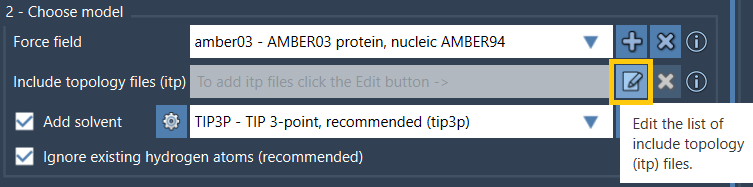
In Choose model, use Edit beside the include topology files (.itp) option and browse to the ligand topology file. Check whether its parametrization also requires a custom force field. For example, an ATB-generated topology may require the corresponding gromos54a7_atb force field. Add a required custom force field using the force-field Add button; GROMACS Wizard stores added force fields for later use.
Then complete the remaining preparation choices, such as solvent model, periodic box, and ions, and click Prepare. If a warning appears, read it rather than treating it as a routine confirmation; the output log is available from the Output button. Once preparation succeeds, the resulting system is saved in the results folder and can optionally be loaded into SAMSON for inspection.
A quick preflight checklist
- Is the ligand parametrized for the force field selected for the system?
- Were hydrogens and chemical features prepared appropriately for the parametrization tool?
- Do the structure and topology use the same ligand name?
- Are you using the updated ligand structure if parametrization changed atoms or added hydrogens?
- Have you included any required custom force field as well as the ligand
.itpfile?
These checks focus attention on the handoff between ligand parametrization and system preparation—the point where small naming or file-selection mismatches can otherwise be easy to miss. For the full workflow and related details, see the GROMACS Wizard protein–ligand systems tutorial.
Note: SAMSON and all SAMSON Extensions are free for non-commercial use. Get SAMSON.