



Converting SMILES codes into 3D molecular structures is essential for molecular modelers working on design, simulation, and analysis tasks. But finding a tool that makes this process seamless can be challenging. If you are looking for an efficient way to generate 3D-ready structures directly from SMILES data, the SMILES Manager extension for SAMSON could be your go-to solution.
In this post, we'll focus on how you can generate 3D molecular structures from SMILES codes using the SMILES Manager. This feature is particularly helpful for those who want to quickly move from string data to detailed, manipulatable 3D molecular designs without unnecessary complexity.
Why Generate 3D Structures?
SMILES (Simplified Molecular Input Line Entry System) notation is a powerful and widely-used way to represent molecular structures as data strings. While SMILES data is great for encoding molecular information into text form, its true power unfolds when you generate 3D molecular structures that you can visualize, analyze, and even modify for various simulations. For instance, generating 3D structures is often a critical step in drug discovery workflows, docking studies, and property predictions.
How to Use the SMILES Manager to Generate 3D Models
The SMILES Manager in SAMSON is built on RDKit, a well-known cheminformatics toolkit that ensures accurate and reliable transformations from SMILES to 3D formats. Let’s explore how this feature works in detail:
Generating 3D Models
Here’s how you can transform strings into 3D molecular structures:
- Select the SMILES strings you'd like to convert using the Manager's table interface. This interface shows SMILES codes alongside generated 2D depictions, molecule names, and more, so you can quickly verify your data.
- Click on the Selected SMILES string to Document action in the Export drop-down menu. This transforms the selected SMILES into 3D structures, which are then added to the active SAMSON document. The structures also retain their corresponding molecule names.
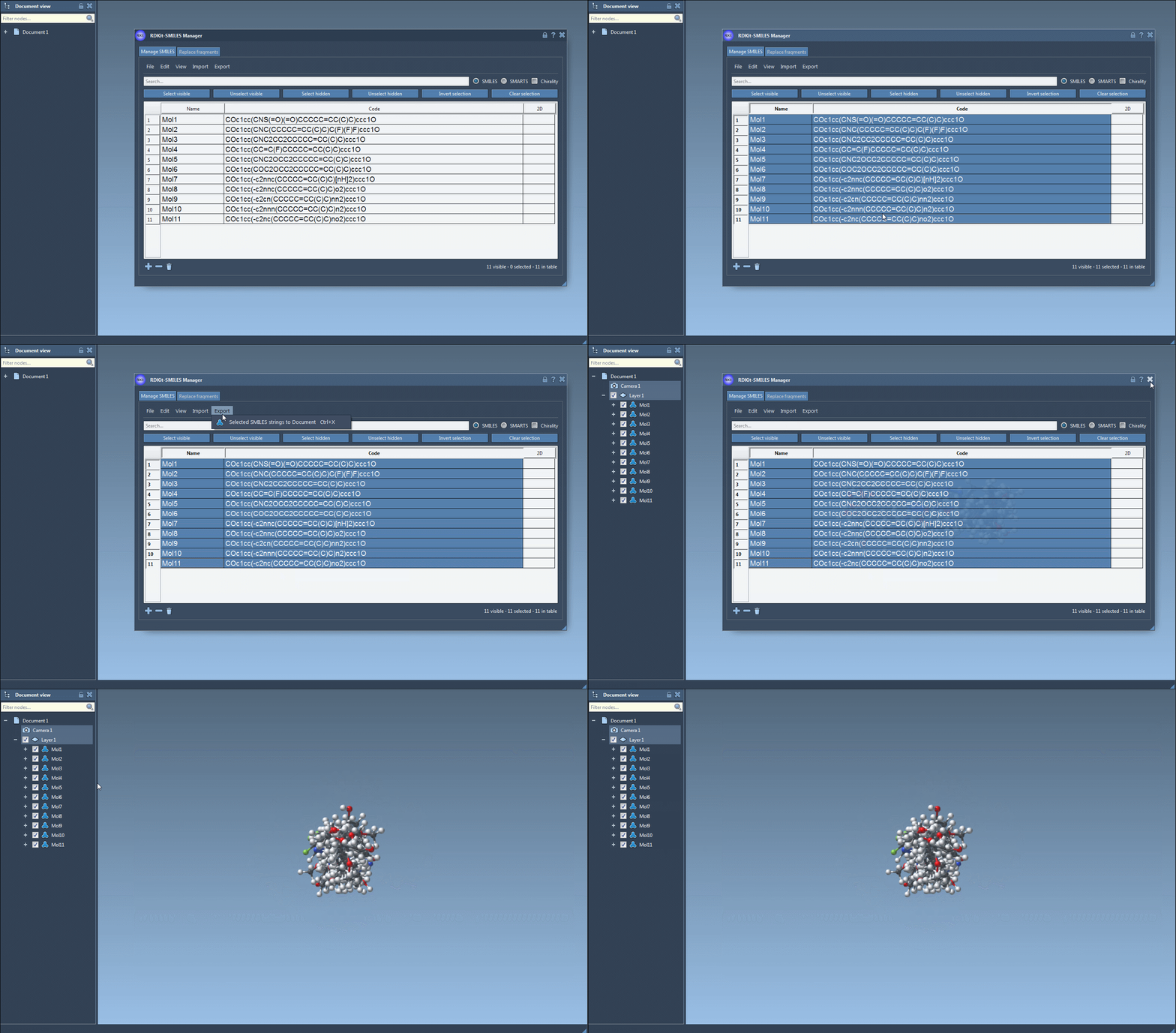
Generate Individual 3D Structures
If you prefer working with individual SMILES strings, you can easily generate their 3D structures:
- Right-click on the SMILES string in the Manager and select Generate 3D structure from the context menu.
- Alternatively, open the large view window for a SMILES code and click the Generate 3D structure button directly.
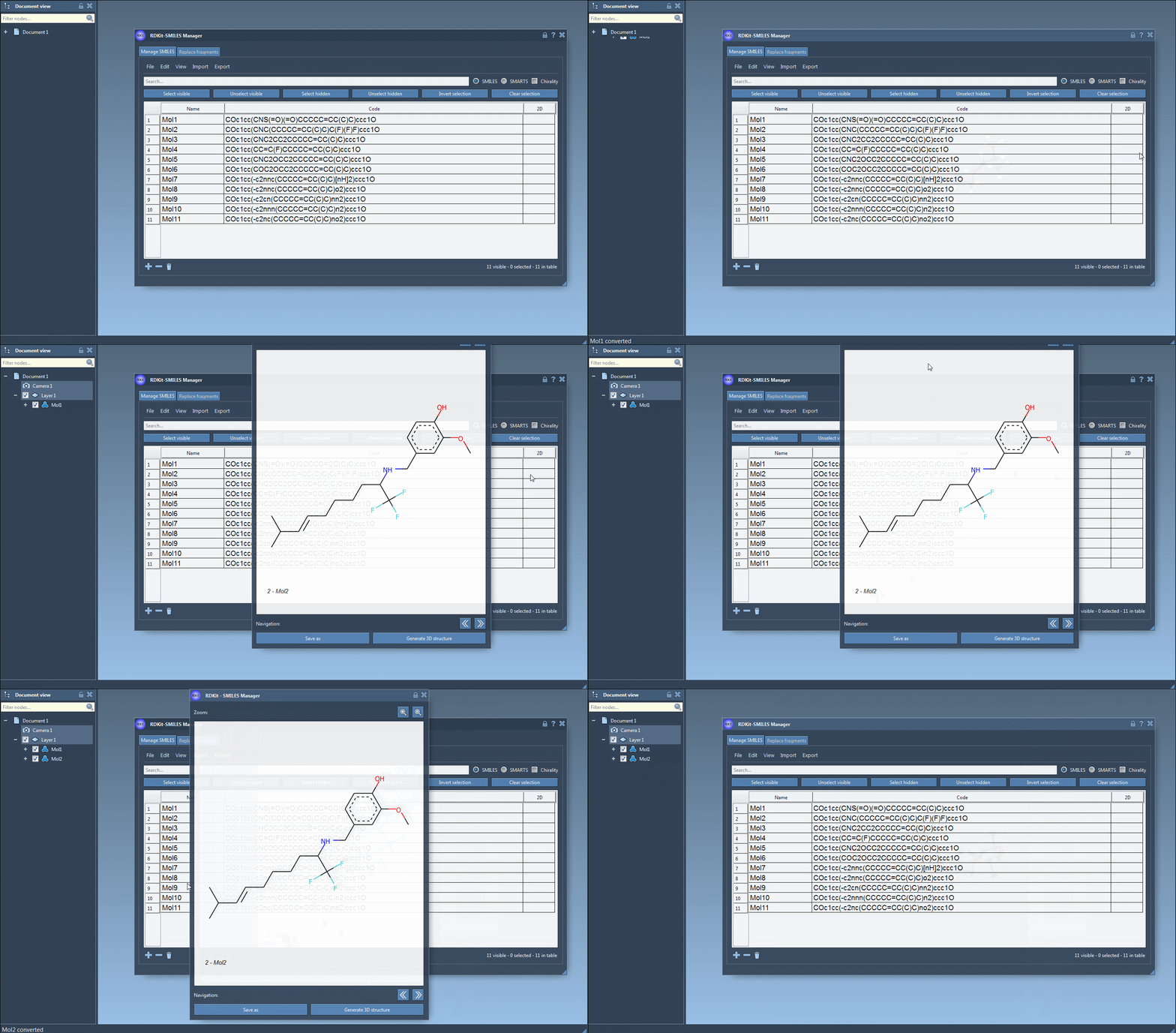
Once you've created the 3D structures, they can be visualized, rotated, zoomed, and compared using SAMSON's powerful molecular viewer. This versatility ensures a smooth transition from SMILES data to actionable molecular models.
Streamlining Your Molecular Modeling Workflow
By facilitating direct SMILES imports, providing an intuitive table interface, and offering tools for single and batch 3D structure generation, the SMILES Manager not only simplifies but also accelerates your molecular design workflows.
To dive deeper into what the SMILES Manager can do, we invite you to explore the full documentation at this page.
Note: SAMSON and all SAMSON Extensions are free for non-commercial use. You can get SAMSON at www.samson-connect.net.