



For molecular modelers tackling protein structure refinement, misaligned residues on the protein backbone can become a significant bottleneck. Resolving these issues manually risks disrupting the structure's integrity, while automated methods might not give the precision needed. This is where the Interactive Ramachandran Plot Extension in SAMSON comes into play, providing a practical solution for exploring and editing protein backbone conformations using φ (phi) and ψ (psi) dihedral angles.
The Ramachandran plot is a cornerstone tool in structural biology. It visualizes the energetically allowed regions for a peptide’s backbone dihedral angles, highlighting favored and disallowed conformations based on steric and energetic constraints. But SAMSON takes this tool a step further: with the Interactive Ramachandran Plot, you can directly manipulate residue conformations, validate their placement, and refine them in real-time during your modeling workflows.
How to Get Started
Here’s how to set up and start working with the Ramachandran Plot:
- Install the Extension: Log into SAMSON Connect, then visit the Interactive Ramachandran Plot Extension page. Click “Add,” and restart SAMSON.
- Visualize a Protein: Open a protein structure in SAMSON (e.g., PDB ID
1YRF) through Home > Fetch. Input the structure ID and load it. - Access the App: Launch the Ramachandran Plot interface via Home > Apps > Biology > Ramachandran Plot.
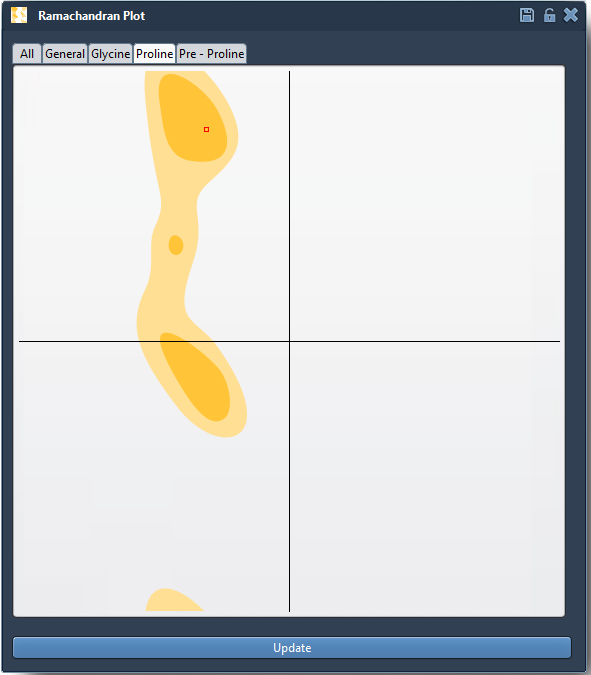
Once the Ramachandran Plot is open, click “Update” to generate the plot, which presents residues as dots:
- Yellow areas indicate energetically favorable regions.
- White areas represent regions with high steric hindrance.

Interactive Exploration and Editing
One helpful feature of SAMSON is the ability to explore individual residues interactively:
- Click on any dot (residue) in the plot to display details such as φ and ψ values in the status bar. Selected residues will also update visually in the protein viewer.
The editing capabilities are equally powerful:
- Drag points directly in the plot to tweak dihedral angles, instantly updating the 3D structure.
- Use the Twister Editor to adjust conformations by twisting residues in 3D space. Real-time feedback ensures seamless manipulation.

This interactivity allows modelers to refine homology structures, fix misaligned residues, and enhance protein stability before running simulations.
Practical Applications
The Interactive Ramachandran Plot proves invaluable for:
- Detecting and resolving strained residues before simulations.
- Refining homology models by correcting outliers.
- Investigating conformational flexibility of active sites and binding regions.
Whether you're preparing a molecular structure for detailed simulations or enhancing structural insights, this tool simplifies an essential yet complex step in molecular modeling.
For detailed instructions and best practices, visit the original documentation page.
Note: SAMSON and all SAMSON Extensions are free for non-commercial use. Get started by downloading SAMSON at samson-connect.net.