



Understanding protein-protein interactions, binding sites, and higher-order structures often demands insights into how proteins assemble symmetrically. For molecular modelers, the challenge of reconstructing such arrangements from raw protein structure files can be daunting and time-consuming. SAMSON’s Symmetry Mate Editor offers a practical solution, enabling you to reconstruct symmetry mates directly from metadata in PDB files, helping you dive deeper into the molecular world of proteins.
The Problem: Decoding Complex Protein Assemblies
Modern molecular modeling often involves simulating complex, symmetric structures such as protein assemblies or nanostructures. However, raw protein data obtained from PDB files typically represents only the asymmetric units rather than the full biological assemblies or crystal packings.
Reconstructing these assemblies involves extracting symmetry data, interpreting it precisely, and managing compatibility with different simulation pipelines. Without the right tools, this process can become error-driven and laborious.
The Solution: Automated Symmetry Mate Generation
With SAMSON’s Symmetry Mate Editor, you can seamlessly generate symmetry mates directly from PDB symmetry information. This streamlined workflow enables modelers to visualize how proteins are organized in crystal structures and biological assemblies, ensuring they can accurately simulate and analyze higher-order structures.
Step-by-Step: Using the Symmetry Mate Editor
- Start by installing the Symmetry Mate Editor extension in SAMSON if you haven’t already.
- Load any PDB file containing symmetry metadata — files often contain either CRYST1 records (for crystal lattice symmetry) or BIOMT records (for biological assembly symmetry).
- Activate the Symmetry Mate Editor:
- Use the Find everything search (Shift + E) to locate “Symmetry Mate Editor.”
- Alternatively, find the editor through the Editors menu on the left-side viewport under … > General > Symmetry Mate Editor.
Exploring Symmetry Mates
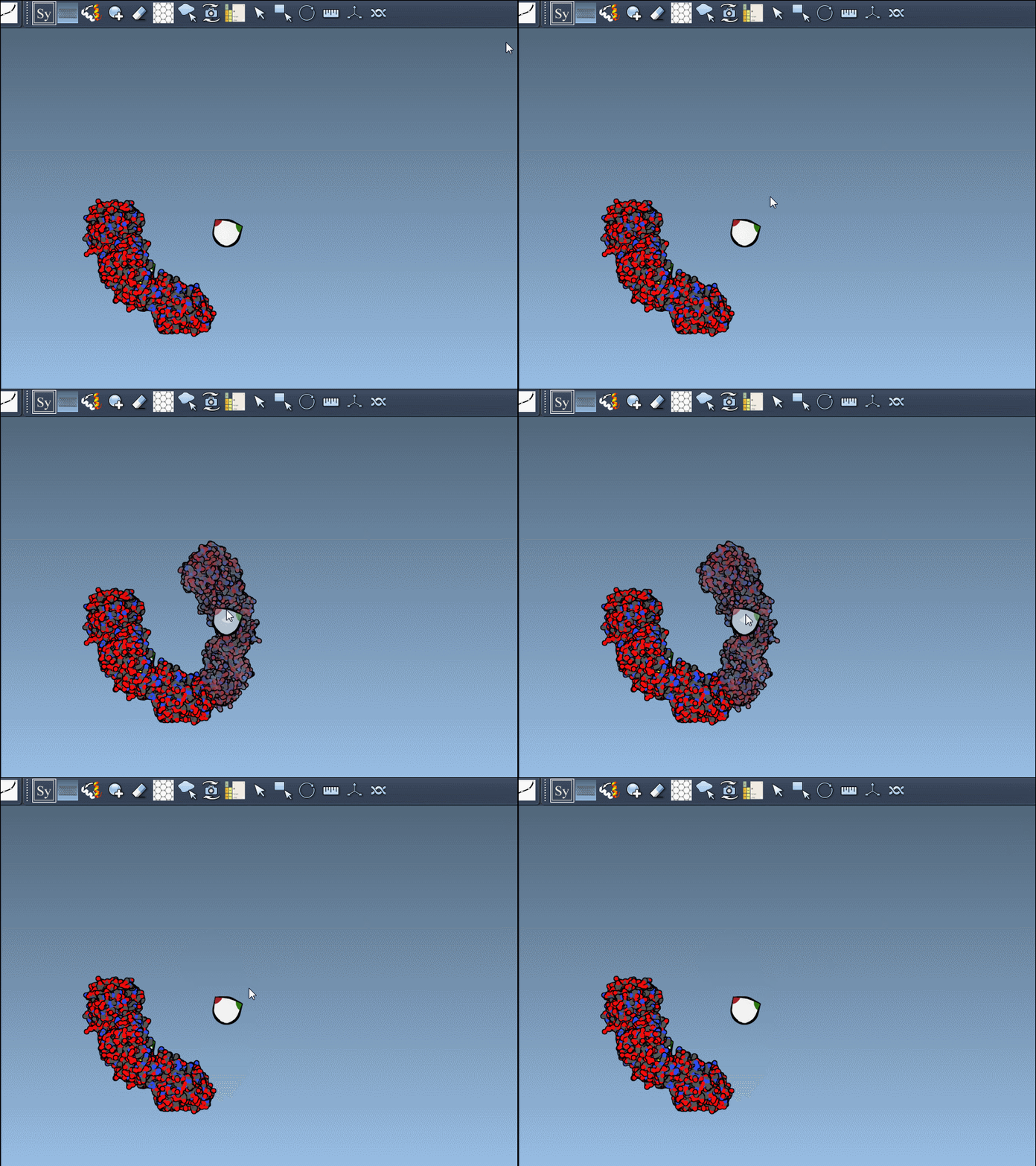
Once the editor is active, SAMSON presents control nodes in the viewport that represent possible symmetry transformations. These allow you to preview and generate replicas intuitively:
- Hovering over a control node previews its replica in real-time.
- Clicking a node permanently generates the structure for deeper exploration.
This intuitive interaction minimizes uncertainty and simplifies workflows in molecular design.
Furthermore, you can preview and generate all replicas at once by holding Ctrl/Cmd while interacting with the control nodes, ensuring efficient scaling for complex assemblies.
Applications in Molecular Design
The benefits of this tool for molecular modelers are numerous, including:
- Reconstructing complete oligomeric assemblies for simulation or design.
- Exploring protein-protein interfaces and identifying potential binding sites.
- Designing symmetric protein nanostructures such as protein cages or scaffolds.
- Testing how certain features, such as binding sites, repeat across symmetry-related chains.
Whether you’re working on quaternary structures, interfacing proteins, or designing symmetric biomolecular assemblies, the Symmetry Mate Editor equips you to quickly and effectively tackle these challenges.
CRYST1 vs. BIOMT: Making the Right Choice
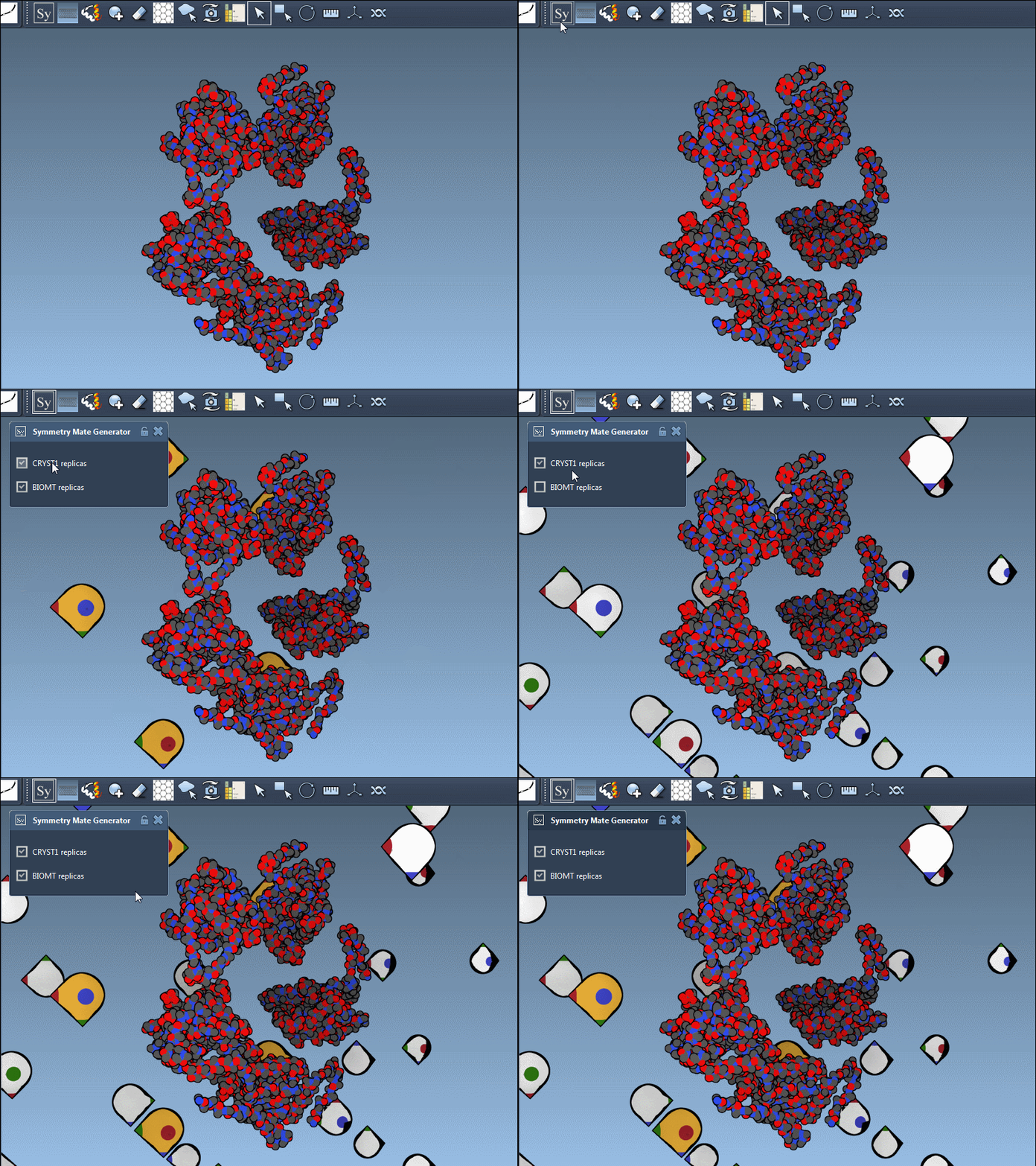
The Symmetry Mate Editor supports both CRYST1 and BIOMT records, represented respectively by white and yellow widgets in the SAMSON interface. These records serve different purposes:
- Use CRYST1 for lattice symmetries derived from the crystal structure.
- Use BIOMT for symmetries related to biological assemblies.
This flexibility ensures that any source of symmetry data in a PDB file can be harnessed for better structural insight.
Conclusion
The Symmetry Mate Editor addresses a critical pain in protein modeling by simplifying the generation of symmetry mates. Whether you need to reconstruct a protein assembly for computational simulation, analyze biological assemblies, or create protein nanostructures, this tool accelerates your modeling process. To dive deeper and explore its applications further, visit the official SAMSON documentation page here: Generate symmetry mates for proteins.
SAMSON and all SAMSON Extensions are free for non-commercial use. You can download SAMSON at https://www.samson-connect.net.