



If you’ve ever tried to interpret complex molecular interactions from a dense 3D structure alone, you know how quickly things can become visually overwhelming. Identifying how a ligand interacts with a protein can require constant rotations, manual measurements, and lots of guesswork. Wouldn’t it be much easier if you could visualize those interactions in a clean, two-dimensional layout, while still keeping them synchronized with your 3D scene? That’s exactly what the Interaction Designer in SAMSON provides.
The Interaction Designer offers an integrated 2D–3D environment that simplifies the analysis of molecular interactions by allowing you to generate editable 2D interaction diagrams directly from your molecular structures. These diagrams are interactively linked to the 3D viewport — what you select or modify in 2D is reflected in 3D, and vice versa.
Creating Interaction Diagrams
To quickly generate a 2D interaction diagram, simply use the Home > Diagram command in the Interaction Designer. If you have a selection, SAMSON will base the diagram on it; otherwise, it will consider the whole document.

What makes these diagrams particularly useful is the wealth of information they can include:
- Binding pockets are automatically displayed for protein-ligand systems.
- Ligand solvent accessibility is visualized.
- All detected interacting residues and structural groups are labeled.
Interactivity in 2D
Each diagram is fully editable:
- You can move labels and interaction symbols to better organize your layout.
- Use the legend to hide/show or recolor interactions to focus on particular details relevant to your hypothesis.
- Easily zoom and translate the diagram for more precise viewing using mouse gestures and keyboard shortcuts.
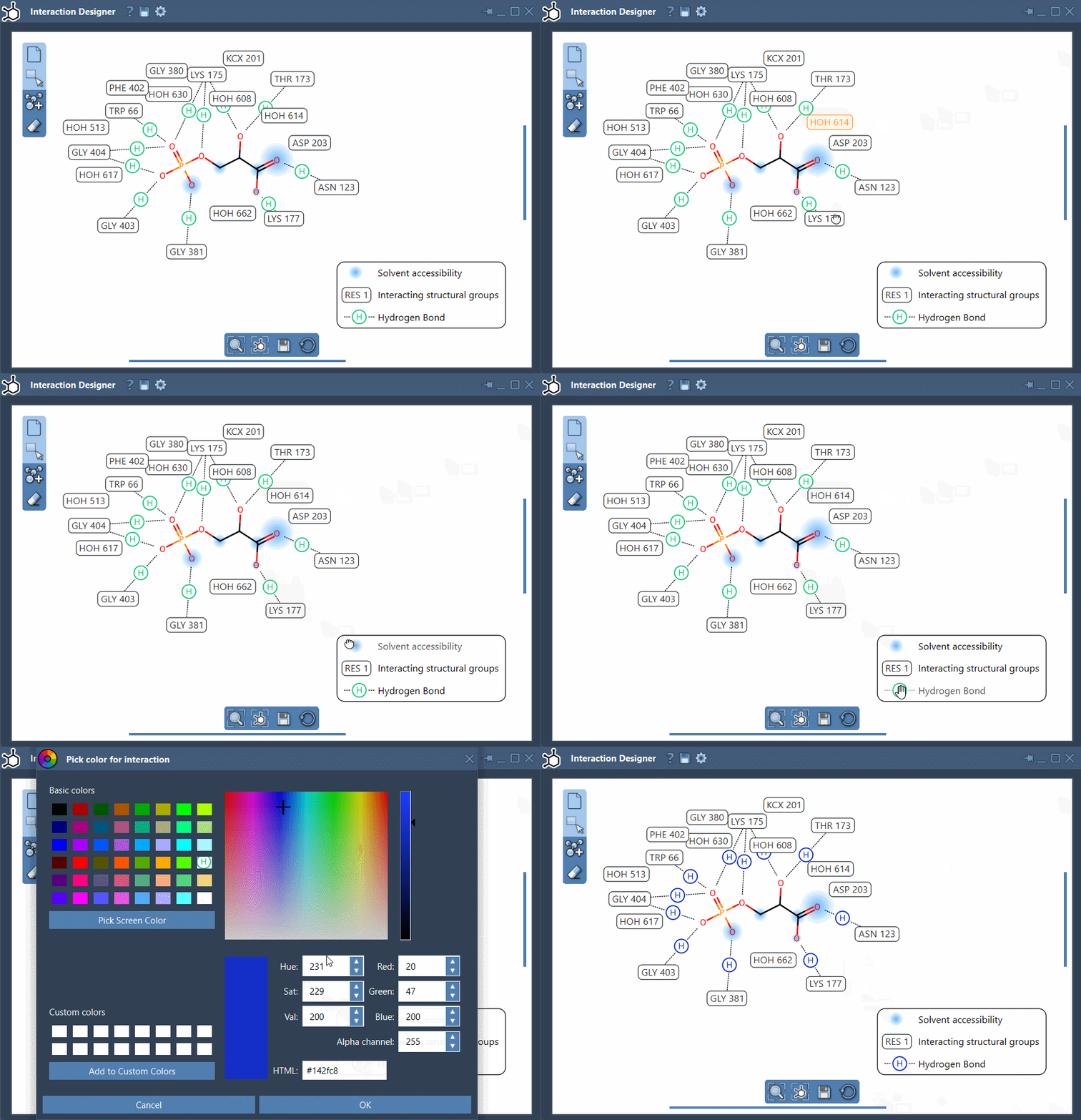
Better yet, interacting atoms and fragments remain synchronized in both environments. That means selecting an atom in 2D highlights it in 3D — great for staying fully contextualized during your analysis.
Why This Matters
Many users working on molecular modeling tasks — especially those analyzing protein-ligand systems — spend considerable time trying to decode how interactions occur spatially. Often, a clear 2D representation can reveal key insights faster. Hydrogen bonds, hydrophobic interactions, π-systems… all of these become more interpretable when laid out clearly and legibly.
Whether you’re preparing a figure for a publication, explaining a binding model to a colleague, or trying to understand a newly docked complex, the Interaction Designer can drastically improve both the clarity and efficiency of your workflow.
Learn More
To dive deeper into how to make the most of interaction diagrams, view the full documentation here: https://documentation.samson-connect.net/users/latest/interaction-designer/
SAMSON and all SAMSON Extensions are free for non-commercial use. You can download SAMSON at https://www.samson-connect.net