



A molecular group can change its overall shape even when a familiar measurement, such as its radius of gyration, does not make the difference easy to interpret. Is the group becoming more elongated or otherwise less sphere-like along a path? A single distance or size measurement cannot answer every shape question. Asphericity offers a compact descriptor for tracking how far a selected group deviates from a spherical shape.
This can be useful when comparing structures along a trajectory or another path: instead of relying on visual inspection alone, you can plot the descriptor across the path and see how the measured shape changes. The result is not a complete explanation of the molecule’s geometry, but it adds a shape-focused view to your analysis.
Build an asphericity plot
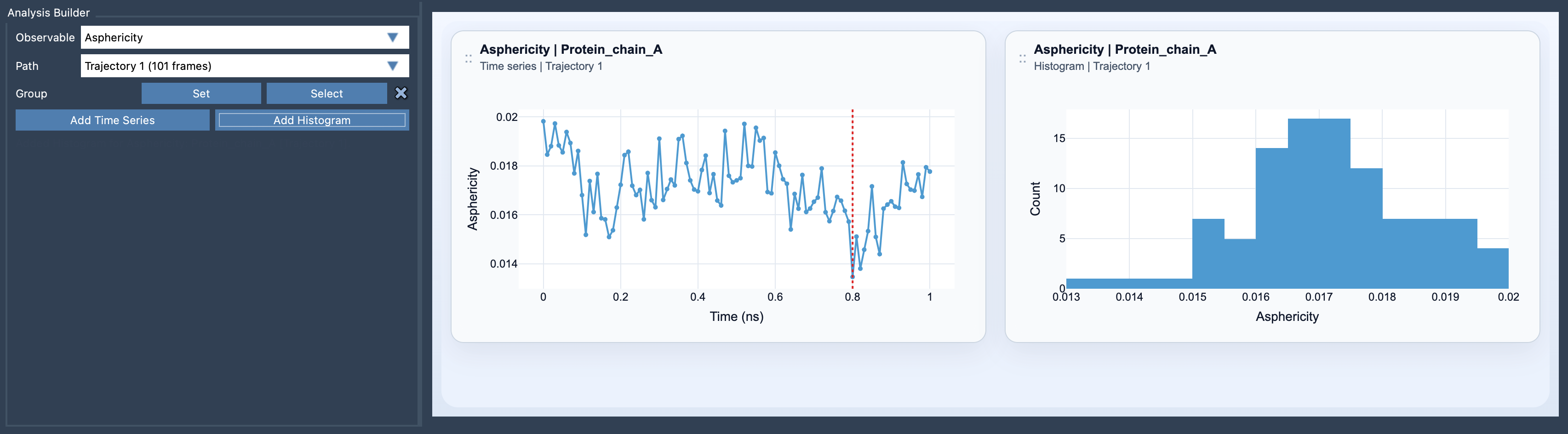
In SAMSON’s Path Analyzer, choose Asphericity as the observable, select a path, and define the atom-containing group you want to analyze. Then add either a time series or a histogram:
- Time series: follow the asphericity values along the path. This view is useful when you want to see where the descriptor changes and how its pattern relates to progress through the path.
- Histogram: inspect the range and distribution of sampled values. This provides a compact summary, but it does not show the order in which those values occurred. Use the time series when sequence matters.
Only one atom-containing selection is required. Still, the choice of group matters: the plot describes the selected group, not every part of the molecular system. Be clear about which atoms your question concerns, and use a consistent group when you want to compare shape over the same path.
Read it as one part of the picture
Asphericity is most helpful when you have a specific shape question. For example, you may want to know whether a selected group’s departure from a spherical shape varies along a path. The plot can point you to intervals worth examining more closely, while the structures themselves provide the context for what is happening.
A useful habit is to pair asphericity with other global shape descriptors. Radius of gyration can help describe overall size, while the shape parameter offers another perspective on global shape changes. These measurements answer related but distinct questions; looking at them together can help avoid treating one value as a complete description of a structure.
Asphericity does not, by itself, identify the cause of a change or explain which local atoms or interactions produced it. Treat it as a summary to guide further inspection, not as a substitute for examining the structures and the rest of your analysis. If a feature appears in the time series, revisit the corresponding part of the path and consider whether the other descriptors support the same interpretation.
To add the plot, open Path Analyzer, choose Asphericity under Observable, select the path and group, then click Add Time Series or Add Histogram. For the full reference, see the Asphericity documentation.
Note: SAMSON and all SAMSON Extensions are free for non-commercial use. Get SAMSON.