



A molecular trajectory can contain a lot of movement and still be difficult to read. A few frames with rapid motion may be hidden in a long, relatively quiet path; alternatively, an overall average can make very different atoms look deceptively similar. When you need to locate changes in motion, a useful first question is not just “How far did the structure move?” but “How fast were the selected atoms moving at each point along the path?”
SAMSON’s Path Analyzer Average velocity observable follows the mean velocity magnitude of a selected atom group along a path. It can help you spot bursts of motion and quieter regions, provided the path contains velocity data for the atoms you selected.
What the average tells you—and what it does not
At each frame t, the analysis averages the magnitudes of the selected atoms’ velocity vectors:
mean speed at t = (1 / number of selected atoms) × sum of |velocity of atom a at t|
This is an average of magnitudes. That distinction matters: it describes how fast the selected atoms are moving, rather than the magnitude of their average velocity vector. Atoms moving in different directions can still contribute positive speeds to the mean. So the result is useful for following overall motion intensity, but it does not tell you whether the group is moving together in one direction.
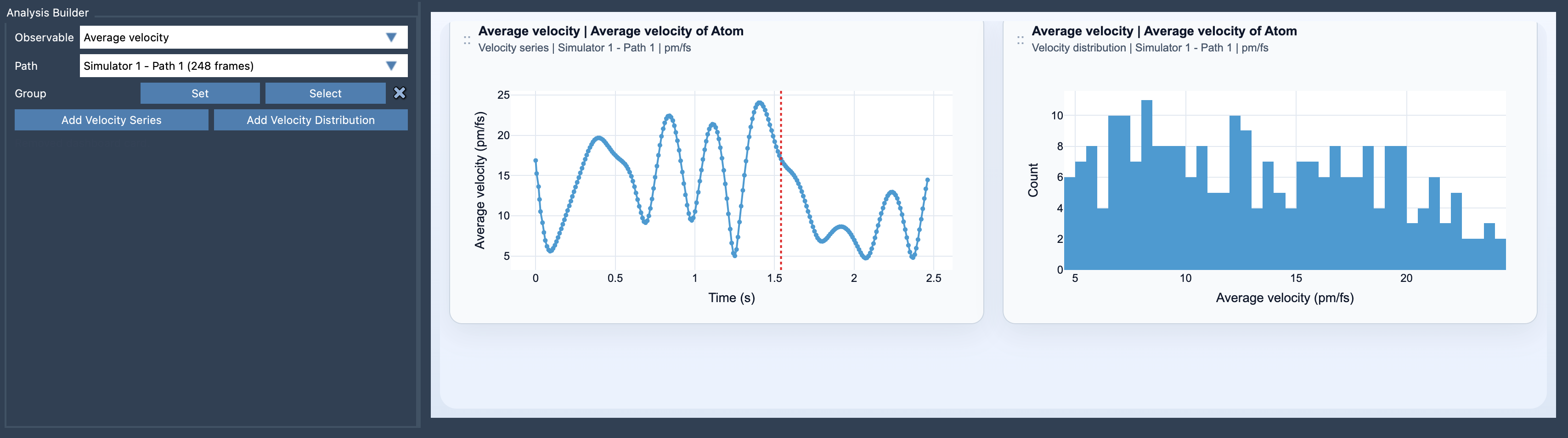
There is another important consequence: a group average can conceal differences between its members. A high value might reflect broad motion across the group, or stronger motion from only some selected atoms. Conversely, a moderate average does not mean every atom is moving at a moderate speed. If that distinction matters to your question, use the Velocity distribution view as a companion to the Velocity series. The series follows the mean magnitude over the path; the distribution lets you inspect the sampled distribution rather than relying on the mean alone.
A practical way to investigate a suspicious region
- Open Path Analyzer and choose Average velocity under Observable.
- Select the path you want to examine, then define an atom-containing group. The selected path must expose velocity data for those atoms.
- Add a Velocity Series to follow how the mean speed changes along the path. Look for regions that stand out from their surroundings, rather than treating one value as a verdict about the entire trajectory.
- Add a Velocity Distribution when you want to examine the sampled values beyond the series’ mean.
For a more useful comparison, keep the group and path in mind when interpreting results: changing the selected atoms changes what is being averaged. A whole-system group and a smaller region answer different questions, so record what you selected if you plan to compare analyses later. Also check the card’s units. After creation, units can be switched between Auto, pm/fs, A/ps, and m/s; using a consistent unit makes comparisons easier to read.
Average velocity is most relevant when the trajectory carries meaningful dynamical information. If you are trying to connect motion with its driving forces, compare the result with the Average force analysis. Treat the two as complementary observables, not as a guarantee that a force change explains every velocity change.
For the complete setup and equation, see the Average velocity documentation.
Note: SAMSON and all SAMSON Extensions are free for non-commercial use. Get SAMSON.