



Two proteins can share a similar structural region without matching equally well across their entire length. If you superimpose the complete structures, the alignment may be a compromise: the region you care about can still look offset. This is a common challenge when comparing a domain, helix, binding-site region, or other selected portion rather than asking how the proteins fit overall.
SAMSON’s Protein Aligner lets you compare sequences and then superimpose structures using selected residues. The key is to treat whole-protein and region-specific alignment as different questions: the first asks how the complete models fit, while the second asks how a chosen part fits.
Start with the sequence comparison
Load the protein structures you want to compare, then open Home > Align to launch Protein Aligner. You can align sequences by structural model or by chain. The chain-based option can be useful when working with oligomers, where a model may contain multiple chains.
The alignment provides a way to inspect which residues correspond across the proteins. You can turn on residue highlighting options to compare properties such as similarity and polarity. Hover over a residue to see its name and ID and highlight it in the viewport. Clicking a residue selects it along with its aligned partners, connecting the sequence view to the structures.

This sequence step is useful before structural fitting: it helps you identify corresponding positions rather than selecting residues based only on where they happen to appear in the 3D view. If you select a residue in the viewport or Document view, it is also highlighted in Protein Aligner.
Compare the global fit first
To see how the complete structures fit, clear any residue selections and click Align to this on the row for the model you want to use as the reference. The other model’s button reports an RMSD value after superposition. In the tutorial’s hemoglobin example, the reported value is shown as 3.27 Å.
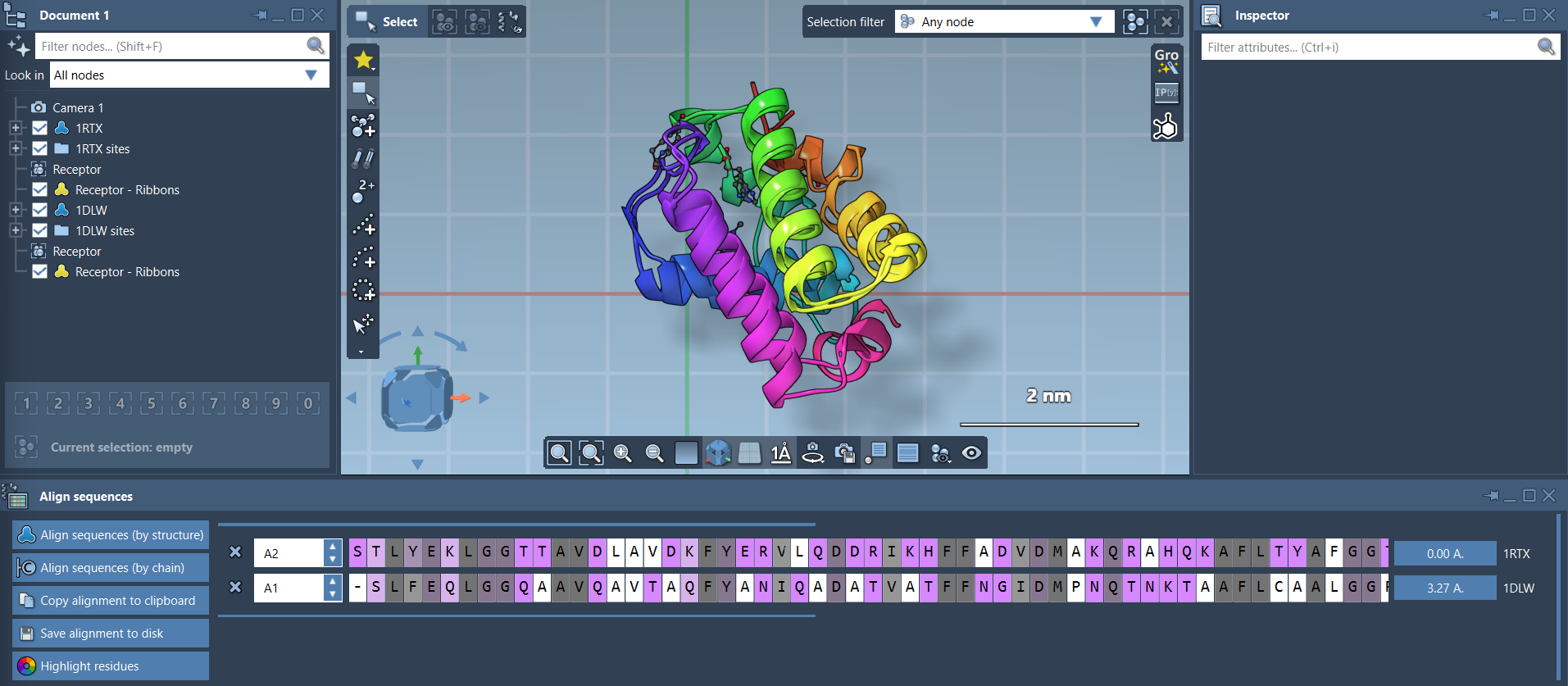
A whole-protein fit is a useful overview, but it may not answer a more focused question. If a particular region is your subject of interest, the global result can make that region appear less well matched than it is when considered on its own. Conversely, a good fit for one selected region does not mean the entire proteins have the same overall conformation. Keep the scope of the fit in mind when interpreting what you see.
Fit only the region you want to study
Return to the sequence alignment and select the corresponding residues in both proteins. For example, the tutorial selects the first 20 residues in each sequence to focus on two similar-looking alpha-helices. Then click the alignment button next to the selection to superimpose the structures using only those selected residues.

The important practical detail is that the selection defines the region used for fitting. Take care to select the residues that represent the structural question you are asking, and make sure the intended corresponding positions are selected in both sequences. To select consecutive residues, hold Shift; to select non-consecutive residues, hold Ctrl or Cmd. Holding Alt removes residues from the selection.

After the region-specific fit, inspect the selected segment and the rest of each protein separately. The selected part has been used to calculate the superposition, so it is the right place to assess that particular fit. The remaining structure provides context: it may reveal differences in orientation or conformation that a local fit does not resolve.
Make the comparison easier to read
If the structures are difficult to distinguish, display them as ribbons through Visualization > Visual model > Ribbons. Creating a separate ribbon model for each protein lets you color them differently. You can also toggle atomistic views using the checkboxes in Document view. These visual choices do not change which residues were used for alignment, but they can make it easier to interpret the result.
The practical takeaway is simple: align the full structures for an overall comparison, then repeat the fit using selected corresponding residues when a specific region matters. Comparing both views helps keep a local structural match from being mistaken for a whole-protein match.
For the complete workflow and additional examples, see the Protein Aligner tutorial.
Note: SAMSON and all SAMSON Extensions are free for non-commercial use. Get SAMSON.