



A molecular trajectory can contain thousands of frames. Comparing every structure with a single reference is useful for tracking change from that one starting point, but it can miss an important pattern: a conformation may disappear for a while and then return, or the trajectory may move between several recurring structural states.
Pairwise RMSD offers a broader view. Instead of comparing each frame only with a reference, it compares every frame with every other frame and displays the results as a square heatmap. This makes it easier to spot groups of frames that resemble one another, as well as regions where similarity changes.
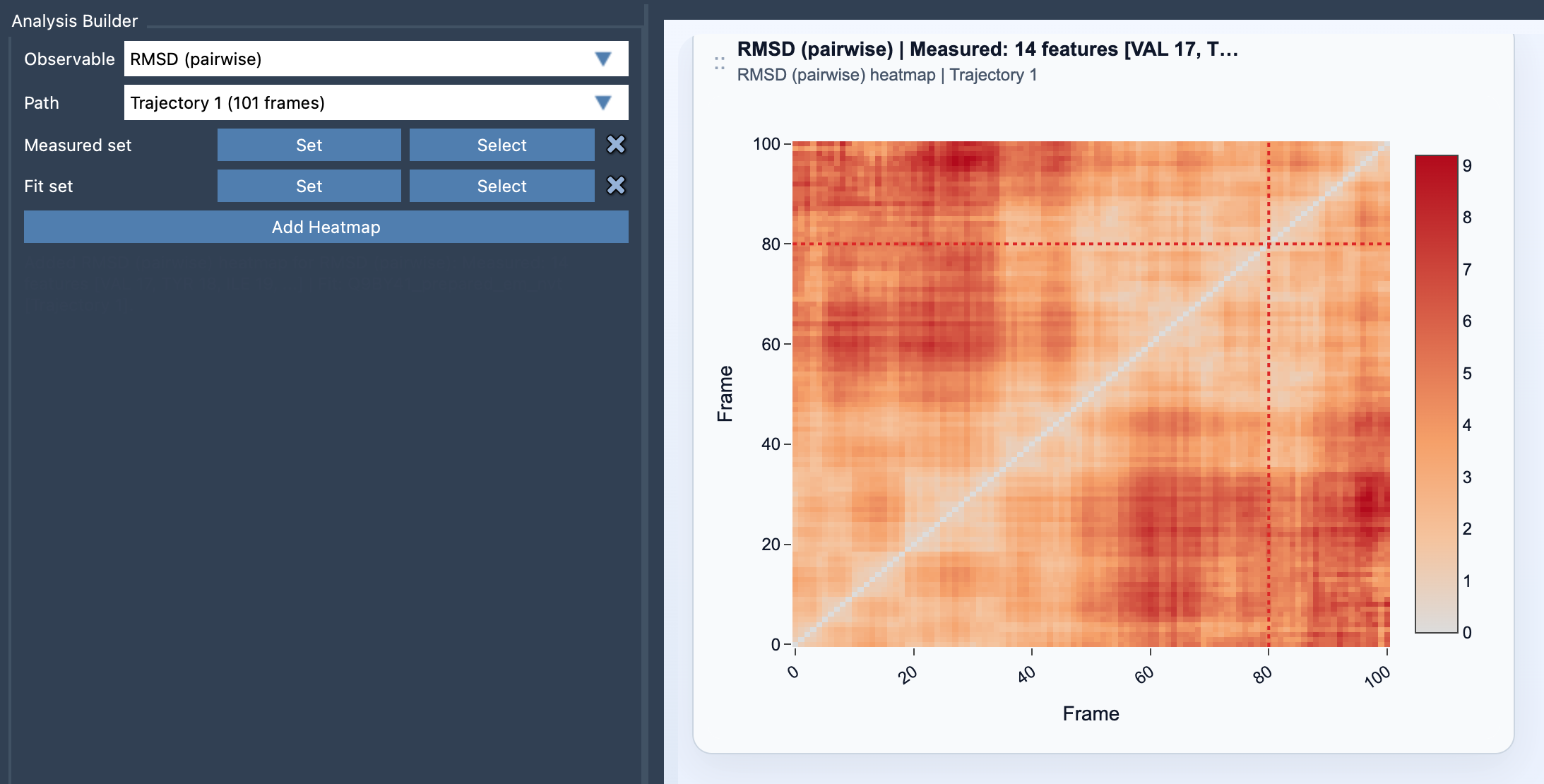
What the heatmap can reveal
Each cell represents the RMSD between two frames. Because the comparison is pairwise, the matrix is symmetric: comparing frame i with frame j gives the same distance as comparing j with i. A frame compared with itself has zero difference.
Look for patterns rather than interpreting a single cell in isolation. A large block of low RMSD values indicates that a group of frames is structurally similar under the selections and alignment used. Several such blocks can suggest recurring conformations or phases in the path. A change in the pattern may point to a transition between groups. These are clues for exploration, not proof on their own that a particular state is stable or energetically favored.
The heatmap is especially helpful when a trajectory revisits a structure. Frames far apart in the path can still show low RMSD if they have similar measured coordinates. A comparison only against the first frame would not make that relationship as immediately visible.
Fit set and measured set: two different jobs
Pairwise RMSD requires two atom-containing selections: a fit set and a measured set. For each pair of frames, Path Analyzer aligns the fit set from one frame onto the other, then calculates the RMSD for the measured set.
That distinction matters. The fit set determines how the structures are superimposed; the measured set determines which atoms contribute to the reported comparison. If you want to assess a part of a molecule relative to a chosen structural frame, think carefully about which atoms should define the alignment and which should be evaluated. Different selections can answer different structural questions, so interpret the resulting heatmap in the context of your selections.
Adding and exploring the plot
- Open Path Analyzer.
- Select RMSD (pairwise) under Observable.
- Choose a Path, then define the Measured set and Fit set.
- Click Add Heatmap.
Clicking a heatmap cell moves the path to the later of the two frames represented by that cell. This lets you use a pattern in the matrix as a starting point for inspecting a particular point in the path.
For a fuller interpretation, compare the structural pattern with another view of the same path. The documentation suggests combining pairwise RMSD with an energy landscape or custom scatter plot for complementary perspectives.
Learn more in the RMSD (pairwise) documentation.
Note: SAMSON and all SAMSON Extensions are free for non-commercial use. Get SAMSON.