



A molecular trajectory can generate many useful measurements: distances, energies, RMSD, radius of gyration, solvent-accessible surface area, and more. But inspecting each scalar analysis separately can make it difficult to answer a practical question: what changes when this other property changes? A custom scatter plot puts two saved scalar analyses into one view, so their relationship across sampled values is easier to examine.
This is useful when a modeler has a specific hypothesis to explore—for example, whether a structural change accompanies an energy change, or whether two observables move together along a path. The plot does not establish why a relationship occurs, but it can help reveal patterns worth investigating and point to frames that deserve a closer look.
Build the comparison from saved analyses
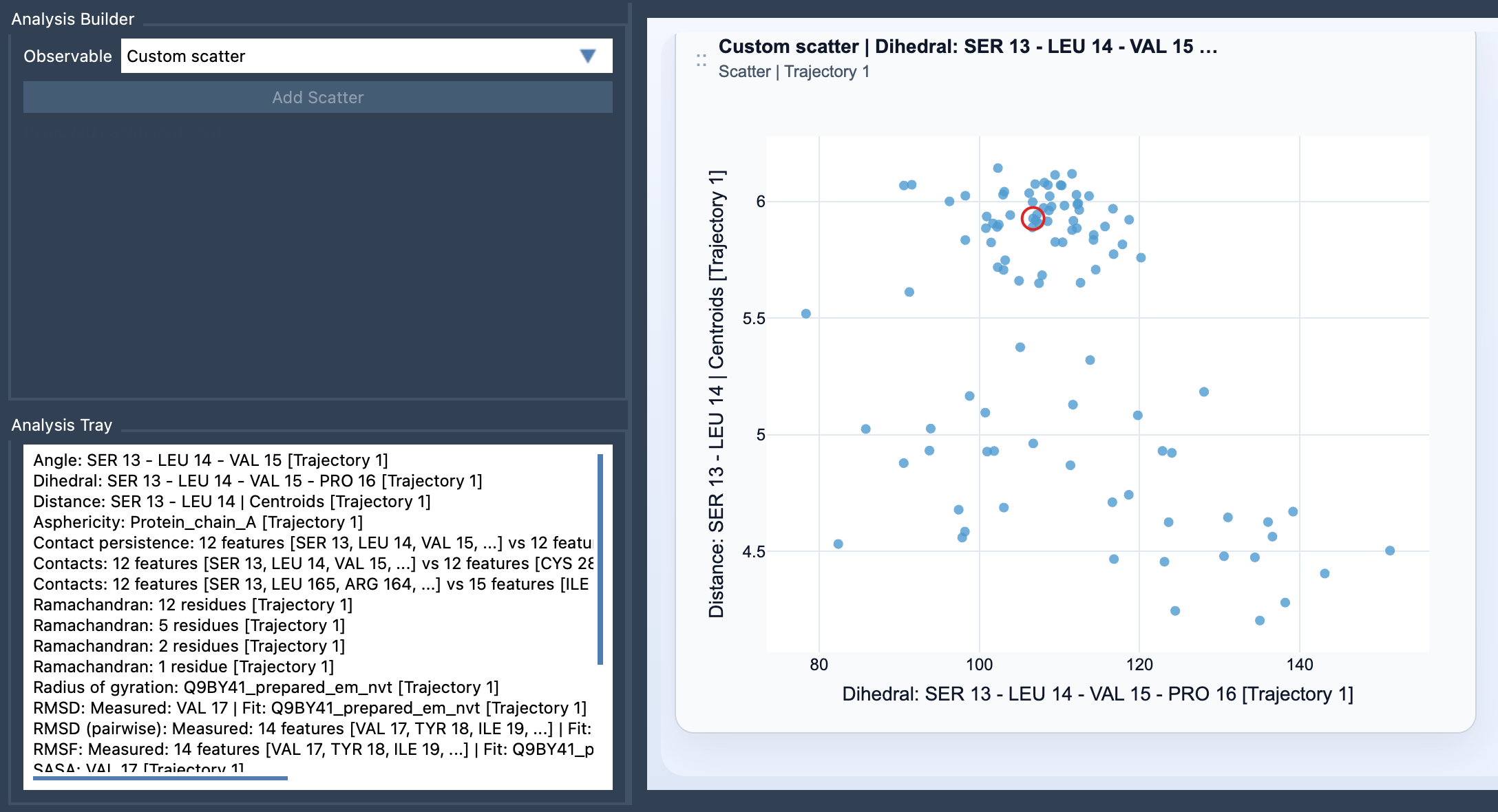
In SAMSON’s Path Analyzer, Custom scatter is a derived analysis: it uses the Analysis Tray rather than direct atom selections. First, create or reuse two saved scalar analyses in the tray. Then choose Custom scatter under Observable, select exactly two scalar analyses, and click Add Scatter.
That “exactly two” requirement is a useful reminder to decide what question the plot should answer before adding it. Choose one measurement for each axis conceptually: for instance, Distance vs Energy if you want to examine how a separation relates to energy, or RMSD vs Radius of gyration if you want to compare structural deviation with overall compactness. These are examples of pairs to investigate, not conclusions about what the data will show.
Read the pattern, then ask a sharper question
Each point in the scatter represents one sampled pair of scalar values. Look first for the broad shape of the point cloud. A trend may suggest that the two measurements vary together; an opposing trend may suggest an anticorrelation. Several groups of points may prompt you to ask whether the trajectory visits distinct regimes. A diffuse cloud, meanwhile, may mean the relationship is not simple—or that another observable or a more focused analysis is needed.
Keep the interpretation modest. A visible association is a clue, not proof that one property causes the other. The same trajectory can pass through different structural states, and a single summary of the point cloud may conceal what happens along the path. Use the scatter to formulate the next question: Which frames correspond to this region? Does the pattern persist across the path? Would a different pair of observables be more informative?
Use frame-linked points to return to the structure
When both source analyses come from the same path and remain frame-linked, the scatter can stay connected to the current frame. Clicking a point can move the path to its corresponding frame. This makes the plot more than a comparison of values: it can help you connect an interesting region of the scatter back to the molecular structure that produced it. Frame linking depends on the source analyses being linked in this way, so check that condition when you want to move between a point and a frame.
For a practical workflow, start with a pair that expresses a clear scientific question. Find any notable pattern, then inspect the corresponding frames where possible. Treat surprising points as prompts to investigate rather than errors or discoveries by themselves. Once the two-variable view has helped you identify an area of interest, you can consider whether a 2D density map or an Energy landscape is a useful next view.
For the setup details, see the Custom Scatter documentation.
Note: SAMSON and all SAMSON Extensions are free for non-commercial use. Get SAMSON.